
Luckily I can restore some of the posts from my email that were lost during the failed upgrade this weekend. I did lose some examples in the OP so I’ll need to restore those as well.
@c_r posted:
Great examples! Thats how far I got with custom List items as well.
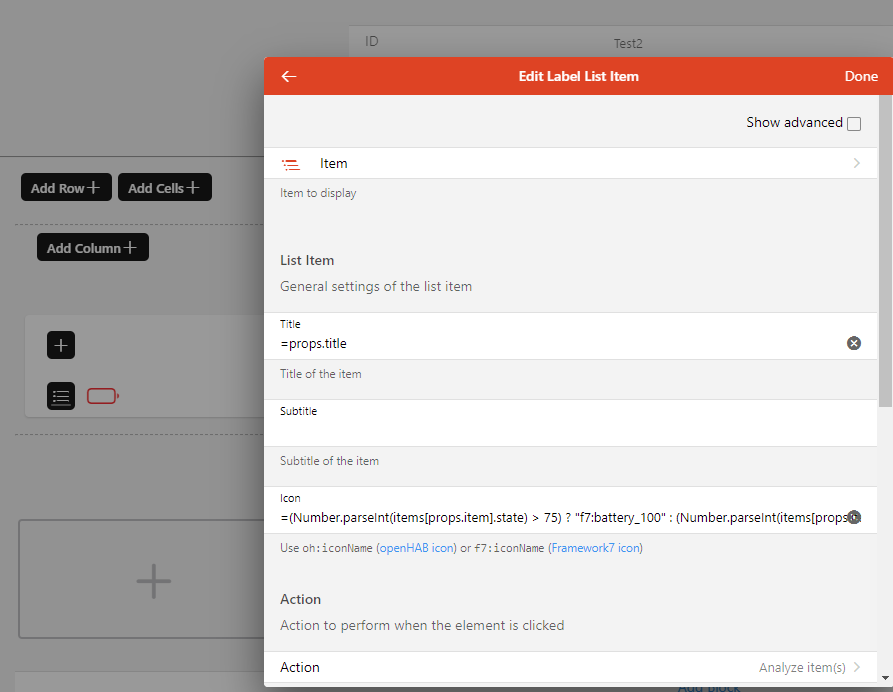
Whats strange is that when you add such a custom widget to a page, you can’t edit the widget properties anymore (in visual edit mode), but instead you can only edit the settings of the (underlying) standard oh-list-item (with the configs set in the widget).
Any idea how this you be changed? I can only get it to work in textual configuration.
Widet Properties:

Properties when putting the widget on a page:
My reply:
I don’t know what you mean specifically about adding them to a page. If you are just adding these to a page as is, that’s probably the problem. These are List Item Widgets. They are not stand alone widgets. They have to be contained by some other widget, such as a Card or a Cell widget. They do not work on their own and that is why they do not render a preview on the custom widget page.
@alfista2600 posted
Thanks for these, Rich. I’ve implemented a few already.
Follow up question: Is there any way to put the Equipment name in the footer of these widgets? Or some type of custom metadata?
When I look at a list of items, they are all named, as example ‘Battery Level’, for when I look at the list of points associated with the equipment. It is ugly to see ‘Equipment Name - Battery Level’ in that view.
My response:
You can customize these how ever you want. But you’ll probably want to add a property to set the Item that represents the equipment and then reference that property.
Personally, I always make sure to give my Items unique labels in addition to Item names so that no matter where the Item is listed (in the model, in the Items settings, etc.) you can always tell what the Item refers to. In other words, the problem is bigger than just the Properties tab of the overview page so I recommend adding the equipment name to the Item’s label instead.
@Malti1812 posted
Hello, I am unfortunately not receiving any data from
action: analyzer. No data analysis is opened.
Data comes from Influxdb
My reply:
Open a new thread to ask for help on that one. There are a number of things that can be wrong and figuring out what is off topic for this thread. All I’ll say on the topic is to make sure all the Items are being saved and make sure InfluxDB is set as the default.
Hello @rlkoshak,
I use
color: '=(Number.parseInt(items[props.Rooms_1 + "_CO2Gehalt"].state) > 800) ? "red" : "gray"'
to get a conditional text color in my widget.
However, for unknown reason the expression is always “false”, hence the text is in gray color.
The state is usually with a Unit “ppm” but due to Number.parseInt the unit is stripped.
I double checked this with Widget Expression Tester and it works fine.
However the condition doesn’t work as expected. Any idea what I did wrong?
Thanks a lot
Stefan
My reply:
There is not enough information to begin to help. All I can recommend is to make sure the props.Rooms_1 is set properly. Double check the state of the Item. Experiment.
@Andrew_Pawelski posted
@c_r I have the same - doesnt seem to allow changes to any variables - oddly, even adding them in the config YAML they actually disappear after saving and going to the run mode.
Ive also noticed the widget not being refreshed - this might be related. When I noticed there were no variables, I hard coded where =props.title would have been and it will not show the updated widget.
My response, see above. The List Widget must be in the slot of some parent container widget. It cannot stand on it’s own.

