
Note that each core gets 100% in top/htop so that means there is one thread in openHAB that is running wild, but you have three other cores that are running at a reasonable level.
Next step is to see if we can find the thread(s) that are monopolizing the CPU. Since only one CPU is pegged it’s most likely one thread.
From the karaf console run the following command:
ttop --stats=tid,name,state,waited_time,waited_count,blocked_time,blocked_count,user_time,cpu_time,user_time_perc,cpu_time_perc,lock_owner_id,lock_owner_name --order=cpu_time --millis=300
The threads will be listed in order with those using the CPU the most time at the top. The first entry in the list is the most likely culprit. It will look something like this:
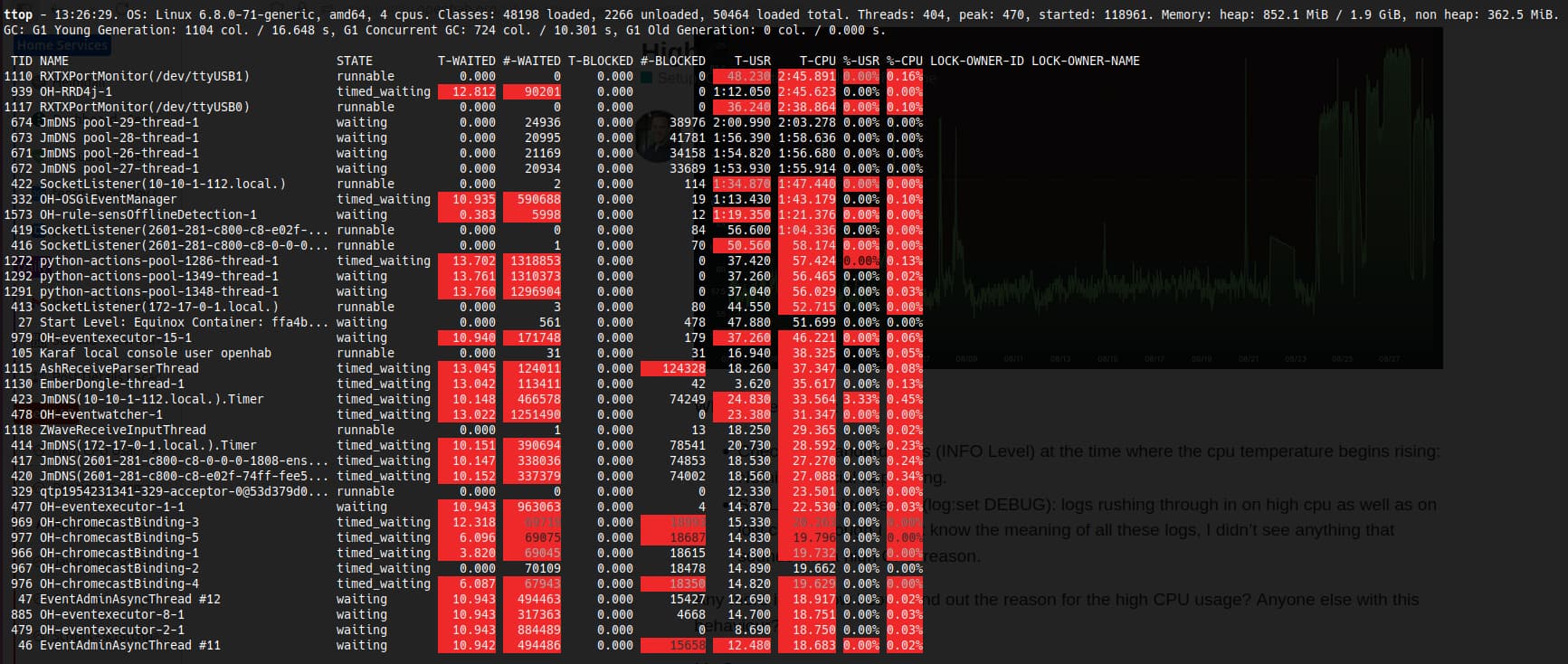
You can get more information about that thread with the command:
threads XXXX
where XXXX is replaces with the thread ID, the number if the first column of the first row in the ttop command. Based on the thread name and stack trace we should be able to identify what it doing. For example, in my screen shot the top CPU user is 1110 and calling threads 1110 shows:
openhab> threads 1110
Thread 1110 RXTXPortMonitor(/dev/ttyUSB1) RUNNABLE
Stacktrace:
gnu.io.RXTXPort.eventLoop line: -2
gnu.io.RXTXPort$MonitorThread.run line: 108
The thread monitoring ttyUSB1 us using the most CPU. That’s the Zigbee coordinator on my system and I’m not too surprised it’s using the most CPU on my system. Yours will probably show a stack trace coming from an add-on or a rule.