
I mean, for example, compare the temperature received in a sensor with a target temperature stored in an item (whose value can be calculated in another rule).
Technically it can be done, however, doing so would make the UI more complex.
I’d imagine:
- Add a radiobutton that says
- Compare against a literal value, or
- Compare against an item state
- And if it’s an item state, present an item Picker
I’d suggest using a script condition in this case. I’m not sure if RulesDSL supports this syntax, but you can pick JRuby and write this very simple statement:
Item1.state >= Item2.state
Personally I think the point of a UI based rule approach is a simple interface for simple actions and IFTTT logic, basically in line with home assistant, google home, amazon or samsung offerings. Mainly for people who don’t need or want anything complex, or they are new to programming.
But anything beyond that, it makes sense just to say “if this trigger condition, then run this code” and do it all in a script.
I’m always careful about wishes that involve integrating a lot of high level code in the context that it’s a small team of volunteers. I’m just holding out for my wish of some features being added to JS scripting.
2 Likes
In a script it is simple. What I would like to have is the trigger condition.
We are just sharing ideas, if this is not possible, or if it’s too complex to implement, it’s Ok.
My use case is the legionella cycle of my DHW system. Sometimes I have to switch in on up to 44º C to have hot water for the baths, others I have to switch it up to 65º C to kill legionella. I’m currently using tasmota and pulsetime without verifying the achieved temperature, which requires some calibration of the pulsetime (not very reliable due to atmosferic conditions).
This one here?

Or this one?

Do you have a proposal for how the UI could meet your requirement whilst at the same time keeping the UI simple for new / “non advanced” users?
For me this would be perfect

Not necessarily with a another_item picker.
But, alternatively, it could be also as

It would be great if Scripts could output a value (or values) and accept inputs. Here is one use-case where I could see this as an advantage:
- Currently graphing in the UI pulls data from the persistence engine via the REST API which is somewhat limiting in terms of the types of graphs that can be created.
- If a script could output data, one could write a script which does some more involved processing and output data in a form for more advanced graphs.
- The REST API would then need to support transferring that output as part of the runNow POST command.
I’m sure there would be additional use-cases, but this one could extend the graphing capabilities without having to resort to grafana or some other tool.
This sounds like a profile
Thank you, @jimtng your reply has led me to JRuby, and I have seen the light.
What I’d like to see in openHAB 5 is that JRuby becomes the default scripting language. Because it makes writing rules beautiful. And the timed commands are pure genius.
1 Like
I just realized something I would want for 5.0, don’t know if it has been suggested somewhere already: A simpler way to check historical values of text Items. When debugging a number item it’s so easy, just click the value in the GUI and you get a nice graph with persisted values. When I want to check what values a text item has had I find myself grepping through log files or diving directly into my persistence database, haven’t found any better way. I realize a graph isn’t an alternative here, but just being able to click up a list of state changes with time stamps would be super good!
Oh something like the bar graphs for on/off but instead a scroll list with timestamps of the various string values for example. Yeah!
1 Like
In the mean time, you can run a quick script to log them out.
Something like this should work (note, untested):
var values = items.MyStringItem.getAllStatesSince(time.toZDT().minusHours(1));
values.forEach(value => console.log(value.timestamp + " | " + value.state));
Obviously, use the amount of time you need to go back. I run stuff like this from the ~Scratchpad~ script all the time.
1 Like
I know some people really hate that HA gets mentioned, but Home assistant does that well - maybe opnenhab could implement that as well?
It would be kinda like a logbook/log filter per item, that has entries like
Item x changed from a to b from source c (e.g. from rule xy, from thing update x, from User input, …).
And no, I dont want to switch to home assistant. But its a nice feature that’s maybe worth adapting.
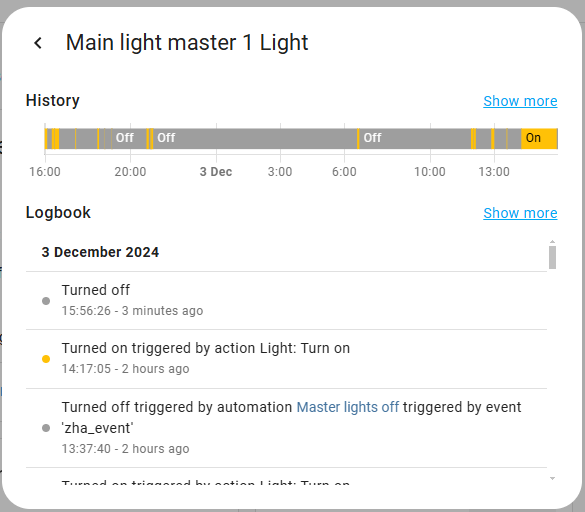
6 Likes
Thanks for the tip. Somehow it doesn’t seem easier than what I’m doing today though 
Never tried HA, but yes, that looks exactly like I’m thinking it would!
1 Like
Just making sure if you’re want such logging facilities on a RPi, use an NVMe drive on RPi 5, or at least a USB SSD for RPi 4.
Constant logging accelerates SD card failure.
I tried this and get:
8:16:31.151 [ERROR] [l.handler.AbstractScriptModuleHandler] - Script execution of rule with UID 'scratchpad' failed: TypeError: (intermediate value).SunSynk_Battery_Current.getAllStatesSince is not a function in <eval> at line number 1 at column number 14
Using:
var values = items.SunSynk_Battery_Current.getAllStatesSince(time.toZDT().minusHours(1));
values.forEach(value => console.log(value.timestamp + " | " + value.state));
This works:
var yesterday = time.toZDT().minusDays(1);
var values =  items.getItem("Water_level_50000_litre_tank").persistence.getAllStatesSince(yesterday)
values.forEach(value => console.log(value.timestamp + " | " + value.state));
2025-04-23 17:40:11.324 [INFO ] [nhab.automation.script.ui.scratchpad] - 2025-04-23T17:33+10:00[Australia/Sydney] | 50398.0
2025-04-23 17:40:11.324 [INFO ] [nhab.automation.script.ui.scratchpad] - 2025-04-23T17:34+10:00[Australia/Sydney] | 50398.0
2025-04-23 17:40:11.325 [INFO ] [nhab.automation.script.ui.scratchpad] - 2025-04-23T17:35+10:00[Australia/Sydney] | 50398.0
2025-04-23 17:40:11.325 [INFO ] [nhab.automation.script.ui.scratchpad] - 2025-04-23T17:36+10:00[Australia/Sydney] | 50398.0
2025-04-23 17:40:11.326 [INFO ] [nhab.automation.script.ui.scratchpad] - 2025-04-23T17:37+10:00[Australia/Sydney] | 50398.0
2025-04-23 17:40:11.326 [INFO ] [nhab.automation.script.ui.scratchpad] - 2025-04-23T17:38+10:00[Australia/Sydney] | 50398.0
2025-04-23 17:40:11.327 [INFO ] [nhab.automation.script.ui.scratchpad] - 2025-04-23T17:39+10:00[Australia/Sydney] | 50398.0
2025-04-23 17:40:11.327 [INFO ] [nhab.automation.script.ui.scratchpad] - 2025-04-23T17:40+10:00[Australia/Sydney] | 50398.0
1 Like
Oh, another thing! I often find myself using the analyzer graph in MainUI to check what’s happening with an item. Since it doesn’t update automatically, my resort is switching back and forth between time scales (ie changing from hour to day and back) just to update it. A little refresh button at the top of the graph would make my life much easier! It’s the little things that matters…
(or even, an option to auto refresh the graph for changing values, this would of course be perfect!)
2 Likes
I just use the browser refresh button… 
But yes a button would be handy if you are using full screen browser setting.
Yep, that’s sometimes an option. But it reloads the entire page which seems unnecessary. Plus it resets everything else in the analyzer as well, such as time scale, added items etc, so it’s often not an option.
1 Like