
This is a widget to put a countdown timer on the HABpanel screen. The result is this:
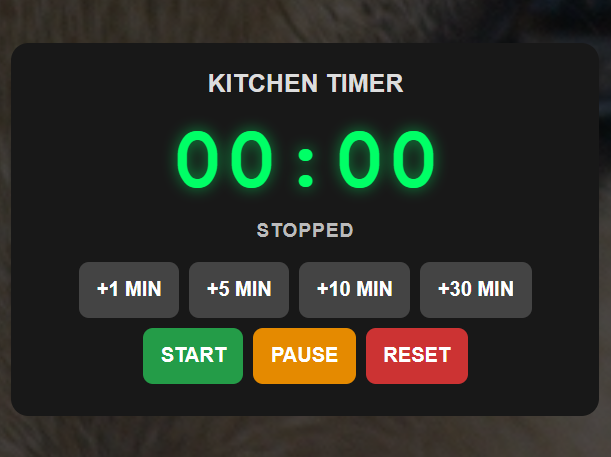
Usage is self explanatory. It uses the MapDB persistence service to save the timer in the event of a refresh or restart.
You will need to have the MapDB persistence service installed along with the JavaScript Scripting Automation language.
You will need the kitchen-timer.js file saved in your $OPENHAB_CONF/automation/js/ directory. Mine is /etc/openhab/automation/js/kitchen-timer.js
const { rules, triggers, items } = require('openhab');


// ============================================================
// KITCHEN TIMER
// ============================================================

const ITEM_COMMAND   = 'KitchenTimer_Command';
const ITEM_REMAINING = 'KitchenTimer_Remaining';
const ITEM_DISPLAY   = 'KitchenTimer_Display';
const ITEM_STATE     = 'KitchenTimer_State';
const ITEM_END_EPOCH = 'KitchenTimer_EndEpoch';
const ITEM_ALARM     = 'KitchenTimer_Alarm';


// ============================================================
// HELPER FUNCTIONS
// ============================================================

function getNumber(itemName, defaultValue) {

    const value =
        Number(items.getItem(itemName).state);

    if (Number.isFinite(value)) {
        return value;
    }

    return defaultValue;
}


function getString(itemName, defaultValue) {

    const value =
        String(items.getItem(itemName).state);

    if (
        value === 'NULL' ||
        value === 'UNDEF' ||
        value === ''
    ) {
        return defaultValue;
    }

    return value;
}


// ============================================================
// FORMAT SECONDS AS MM:SS
// ============================================================

function formatTime(totalSeconds) {

    let seconds =
        Math.max(0, Math.floor(totalSeconds));

    const minutes =
        Math.floor(seconds / 60);

    const remainingSeconds =
        seconds % 60;

    return (
        String(minutes).padStart(2, '0') +
        ':' +
        String(remainingSeconds).padStart(2, '0')
    );
}


// ============================================================
// UPDATE DISPLAY
// ============================================================

function updateDisplay(seconds) {

    seconds =
        Math.max(0, Math.floor(seconds));

    items
        .getItem(ITEM_REMAINING)
        .postUpdate(seconds);

    items
        .getItem(ITEM_DISPLAY)
        .postUpdate(formatTime(seconds));
}


// ============================================================
// ALARM
// ============================================================

function startAlarm() {

    console.info(
        'KITCHEN TIMER: Alarm ON'
    );

    items
        .getItem(ITEM_ALARM)
        .postUpdate('ON');
}


function stopAlarm() {

    items
        .getItem(ITEM_ALARM)
        .postUpdate('OFF');
}


// ============================================================
// ADD MINUTES
// ============================================================

function addMinutes(minutes) {

    stopAlarm();

    const state =
        getString(ITEM_STATE, 'STOPPED');

    const secondsToAdd =
        minutes * 60;


    // --------------------------------------------------------
    // TIMER IS CURRENTLY RUNNING
    //
    // Extend the end time instead of changing only the
    // remaining-seconds Item.
    // --------------------------------------------------------

    if (state === 'RUNNING') {

        let endEpoch =
            getNumber(
                ITEM_END_EPOCH,
                Date.now()
            );

        if (endEpoch < Date.now()) {
            endEpoch = Date.now();
        }

        endEpoch +=
            secondsToAdd * 1000;

        items
            .getItem(ITEM_END_EPOCH)
            .postUpdate(endEpoch);

        const remaining =
            Math.max(
                0,
                Math.ceil(
                    (endEpoch - Date.now()) / 1000
                )
            );

        updateDisplay(remaining);

        console.info(
            'KITCHEN TIMER: Added ' +
            minutes +
            ' minute(s) while running'
        );

        return;
    }


    // --------------------------------------------------------
    // TIMER IS STOPPED OR PAUSED
    // --------------------------------------------------------

    let remaining =
        getNumber(
            ITEM_REMAINING,
            0
        );

    remaining += secondsToAdd;

    updateDisplay(remaining);

    if (state !== 'PAUSED') {

        items
            .getItem(ITEM_STATE)
            .postUpdate('READY');
    }

    console.info(
        'KITCHEN TIMER: Added ' +
        minutes +
        ' minute(s), now ' +
        formatTime(remaining)
    );
}


// ============================================================
// START TIMER
// ============================================================

function startTimer() {

    const remaining =
        getNumber(
            ITEM_REMAINING,
            0
        );


    // Don't start a timer with no time
    if (remaining <= 0) {

        console.info(
            'KITCHEN TIMER: START ignored - no time set'
        );

        return;
    }


    stopAlarm();


    const endEpoch =
        Date.now() +
        (remaining * 1000);


    items
        .getItem(ITEM_END_EPOCH)
        .postUpdate(endEpoch);


    items
        .getItem(ITEM_STATE)
        .postUpdate('RUNNING');


    console.info(
        'KITCHEN TIMER: Started at ' +
        formatTime(remaining)
    );
}


// ============================================================
// PAUSE TIMER
// ============================================================

function pauseTimer() {

    const state =
        getString(
            ITEM_STATE,
            'STOPPED'
        );


    if (state !== 'RUNNING') {

        console.info(
            'KITCHEN TIMER: PAUSE ignored - not running'
        );

        return;
    }


    const endEpoch =
        getNumber(
            ITEM_END_EPOCH,
            Date.now()
        );


    const remaining =
        Math.max(
            0,
            Math.ceil(
                (endEpoch - Date.now()) / 1000
            )
        );


    updateDisplay(remaining);


    items
        .getItem(ITEM_END_EPOCH)
        .postUpdate(0);


    items
        .getItem(ITEM_STATE)
        .postUpdate('PAUSED');


    console.info(
        'KITCHEN TIMER: Paused at ' +
        formatTime(remaining)
    );
}


// ============================================================
// RESET TIMER
// ============================================================

function resetTimer() {

    stopAlarm();


    items
        .getItem(ITEM_END_EPOCH)
        .postUpdate(0);


    items
        .getItem(ITEM_STATE)
        .postUpdate('STOPPED');


    updateDisplay(0);


    console.info(
        'KITCHEN TIMER: Reset'
    );
}


// ============================================================
// TIMER FINISHED
// ============================================================

function finishTimer() {

    items
        .getItem(ITEM_END_EPOCH)
        .postUpdate(0);


    items
        .getItem(ITEM_STATE)
        .postUpdate('FINISHED');


    updateDisplay(0);


    startAlarm();


    console.info(
        'KITCHEN TIMER: Finished'
    );
}


// ============================================================
// HABPANEL COMMAND HANDLER
//
// IMPORTANT:
// We know from testing your system that the event parameter
// does NOT expose the command in the expected location.
//
// HABPanel successfully updates KitchenTimer_Command, so this
// rule reads the Item state directly.
// ============================================================

rules.JSRule({

    name: 'Kitchen Timer Commands',

    description:
        'Handles Kitchen Timer commands from HABPanel',

    triggers: [

        triggers.ItemCommandTrigger(
            ITEM_COMMAND
        )

    ],

    execute: () => {


        const command =
            String(
                items
                    .getItem(ITEM_COMMAND)
                    .state
            );


        console.info(
            'KITCHEN TIMER COMMAND: ' +
            command
        );


        if (command === 'ADD1') {

            addMinutes(1);

        }

        else if (command === 'ADD5') {

            addMinutes(5);

        }

        else if (command === 'ADD10') {

            addMinutes(10);

        }

        else if (command === 'ADD30') {

            addMinutes(30);

        }

        else if (command === 'START') {

            startTimer();

        }

        else if (command === 'PAUSE') {

            pauseTimer();

        }

        else if (command === 'RESET') {

            resetTimer();

        }

        else if (command === 'SILENCE') {

            stopAlarm();

            console.info(
                'KITCHEN TIMER: Alarm silenced'
            );

        }

    }

});


// ============================================================
// COUNTDOWN
//
// Executes once every second.
//
// Instead of simply subtracting 1 every second,
// remaining time is calculated from the stored ending
// timestamp.
//
// This prevents timer drift.
// ============================================================

rules.JSRule({

    name: 'Kitchen Timer Countdown',

    description:
        'Updates Kitchen Timer remaining time',

    triggers: [

        triggers.GenericCronTrigger(
            '* * * * * ?'
        )

    ],

    execute: () => {


        const state =
            getString(
                ITEM_STATE,
                'STOPPED'
            );


        if (state !== 'RUNNING') {
            return;
        }


        const endEpoch =
            getNumber(
                ITEM_END_EPOCH,
                0
            );


        // Something is wrong if there is
        // no stored end time.

        if (endEpoch <= 0) {

            console.warn(
                'KITCHEN TIMER: Running but no end time exists'
            );

            resetTimer();

            return;
        }


        const remaining =
            Math.max(
                0,
                Math.ceil(
                    (endEpoch - Date.now()) / 1000
                )
            );


        if (remaining <= 0) {

            finishTimer();

        }

        else {

            updateDisplay(remaining);

        }

    }

});


// ============================================================
// INITIALIZATION / OPENHAB STARTUP
// ============================================================

rules.JSRule({

    name: 'Kitchen Timer Initialization',

    description:
        'Restores Kitchen Timer after openHAB startup',

    triggers: [

        triggers.SystemStartlevelTrigger(100)

    ],

    execute: () => {


        let state =
            getString(
                ITEM_STATE,
                'STOPPED'
            );


        // ----------------------------------------------------
        // Timer was running before restart
        // ----------------------------------------------------

        if (state === 'RUNNING') {

            const endEpoch =
                getNumber(
                    ITEM_END_EPOCH,
                    0
                );


            const remaining =
                Math.max(
                    0,
                    Math.ceil(
                        (endEpoch - Date.now()) / 1000
                    )
                );


            if (remaining <= 0) {

                finishTimer();

            }

            else {

                updateDisplay(remaining);

                console.info(
                    'KITCHEN TIMER: Restored running timer at ' +
                    formatTime(remaining)
                );

            }


            return;
        }


        // ----------------------------------------------------
        // If not running, restore displayed remaining time
        // ----------------------------------------------------

        const remaining =
            getNumber(
                ITEM_REMAINING,
                0
            );


        updateDisplay(remaining);


        // Handle uninitialized timer
        if (
            state === 'NULL' ||
            state === 'UNDEF' ||
            state === ''
        ) {

            items
                .getItem(ITEM_STATE)
                .postUpdate('STOPPED');

        }


        console.info(
            'KITCHEN TIMER: Initialized at ' +
            formatTime(remaining)
        );

    }

});
Along with the kitchen-timer.items file save in your $OPENHAB_CONF/items/ directory. Mine is /etc/openhab/items/timer.items
Number KitchenTimer_Remaining "Remaining [%d seconds]"
Number KitchenTimer_EndEpoch  "End time [%d]"

String KitchenTimer_Display   "Timer [%s]"
String KitchenTimer_State     "Timer state [%s]"
String KitchenTimer_Command   "Timer command [%s]"

Switch KitchenTimer_Alarm     "Timer alarm"
You will also need this added to your mapdb.persist file located in OPENHAB_CONF/persistence/. Mine is /etc/openhab/persistence/.
Items {
    KitchenTimer_Remaining : strategy = everyChange, restoreOnStartup
    KitchenTimer_EndEpoch  : strategy = everyChange, restoreOnStartup
    KitchenTimer_Display   : strategy = everyChange, restoreOnStartup
    KitchenTimer_State     : strategy = everyChange, restoreOnStartup
    KitchenTimer_Alarm     : strategy = everyChange, restoreOnStartup
}
You will need to create a new widget. In the settings tab you will need to add a setting. Type is string, ID is KitchenTimer_Command, and Default Value is KitchenTimer_Command. Name the widget Kitchen-Timer
<style>
.kitchen-timer-widget {
    box-sizing: border-box;
    width: 100%;
    height: 100%;
    min-height: 280px;
    padding: 18px;
    border-radius: 14px;
    background: #181818;
    color: white;
    text-align: center;
    font-family: Arial, Helvetica, sans-serif;
}

.kitchen-timer-title {
    margin-bottom: 4px;
    color: #dddddd;
    font-size: 20px;
    font-weight: bold;
    text-transform: uppercase;
}

.kitchen-timer-display {
    margin: 10px 0 4px 0;
    color: #00ff66;
    font-family: "Courier New", monospace;
    font-size: 72px;
    font-weight: bold;
    line-height: 1.1;
    text-align: center;
    text-shadow: 0 0 12px rgba(0, 255, 102, 0.55);
}

.kitchen-timer-status {
    min-height: 23px;
    margin-bottom: 12px;
    color: #bbbbbb;
    font-size: 15px;
    font-weight: bold;
    letter-spacing: 1px;
}

.kitchen-timer-button-row {
    display: flex;
    flex-wrap: wrap;
    justify-content: center;
    gap: 8px;
    margin: 8px 0;
}

.kitchen-timer-button {
    min-width: 74px;
    padding: 11px 14px;
    border: none;
    border-radius: 8px;
    outline: none;
    background-color: #444444;
    color: white !important;
    font-size: 16px;
    font-weight: bold;
    cursor: pointer;
    touch-action: manipulation;
}

.kitchen-timer-button:hover {
    filter: brightness(1.15);
}

.kitchen-timer-button:active {
    transform: scale(0.95);
}

.kitchen-timer-start {
    background-color: #249c48;
}

.kitchen-timer-pause {
    background-color: #e58a00;
}

.kitchen-timer-reset {
    background-color: #cc3333;
}

.kitchen-timer-silence {
    background-color: #7b3fc6;
}

.kitchen-timer-running {
    color: #00ff66;
}

.kitchen-timer-paused {
    color: #ffb52e;
}

.kitchen-timer-finished {
    color: #ff3333;
    text-shadow: 0 0 16px rgba(255, 0, 0, 0.9);
    animation: kitchen-timer-flash 0.6s infinite;
}

.kitchen-timer-alarm-message {
    margin: 10px 0;
    color: #ff3333;
    font-size: 20px;
    font-weight: bold;
    animation: kitchen-timer-flash 0.6s infinite;
}

@keyframes kitchen-timer-flash {
    0% {
        opacity: 1;
    }

    50% {
        opacity: 0.2;
    }

    100% {
        opacity: 1;
    }
}

@media (max-width: 500px) {
    .kitchen-timer-display {
        font-size: 54px;
    }

    .kitchen-timer-button {
        min-width: 65px;
        padding: 10px 11px;
        font-size: 14px;
    }
}
</style>


<div class="kitchen-timer-widget">

    <div class="kitchen-timer-title">
        Kitchen Timer
    </div>


    <div class="kitchen-timer-display"
         ng-class="{
             'kitchen-timer-running':
                 itemValue('KitchenTimer_State') == 'RUNNING',

             'kitchen-timer-paused':
                 itemValue('KitchenTimer_State') == 'PAUSED',

             'kitchen-timer-finished':
                 itemValue('KitchenTimer_Alarm') == 'ON'
         }">

        {{itemValue('KitchenTimer_Display') || '00:00'}}

    </div>


    <div class="kitchen-timer-status">
        {{itemValue('KitchenTimer_State') || 'STOPPED'}}
    </div>


    <div class="kitchen-timer-button-row">

        <button type="button"
                class="kitchen-timer-button"
                ng-click="sendCmd('KitchenTimer_Command', 'ADD1')">
            +1 MIN
        </button>

        <button type="button"
                class="kitchen-timer-button"
                ng-click="sendCmd('KitchenTimer_Command', 'ADD5')">
            +5 MIN
        </button>

        <button type="button"
                class="kitchen-timer-button"
                ng-click="sendCmd('KitchenTimer_Command', 'ADD10')">
            +10 MIN
        </button>

        <button type="button"
                class="kitchen-timer-button"
                ng-click="sendCmd('KitchenTimer_Command', 'ADD30')">
            +30 MIN
        </button>

    </div>


    <div class="kitchen-timer-button-row">

        <button type="button"
                class="kitchen-timer-button kitchen-timer-start"
                ng-click="sendCmd('KitchenTimer_Command', 'START')">
            START
        </button>

        <button type="button"
                class="kitchen-timer-button kitchen-timer-pause"
                ng-click="sendCmd('KitchenTimer_Command', 'PAUSE')">
            PAUSE
        </button>

        <button type="button"
                class="kitchen-timer-button kitchen-timer-reset"
                ng-click="sendCmd('KitchenTimer_Command', 'RESET')">
            RESET
        </button>

    </div>


    <div ng-if="itemValue('KitchenTimer_Alarm') == 'ON'">

        <div class="kitchen-timer-alarm-message">
            TIMER FINISHED
        </div>

        <button type="button"
                class="kitchen-timer-button kitchen-timer-silence"
                ng-click="sendCmd('KitchenTimer_Command', 'SILENCE')">
            SILENCE ALARM
        </button>

        <audio autoplay loop>
            <source
                src="/static/kitchen-timer-alarm.mp3"
                type="audio/mpeg">
        </audio>

    </div>

</div>
You will also need an mp3 file to use as the alarm named kitchen-timer-alarm.mp3 saved in your $OPENHAB_CONF/html/ directory. Mine is /etc/openhab//html/