
Why I built this
I wanted to open the openHAB Main UI to the whole family, but only let the kids switch a handful of items. Seeing everything is fine; switching the heating, the front door or a sibling’s lights is not.
openHAB core has two roles (administrator and user) and no per-item permissions; custom roles with visibleTo only hide widgets. Anyone with the user role — or anonymous clients when implicitUserRole is on — can send commands to every item, update states, run rules via /rest/rules/{uid}/runnow and talk to the voice interpreters. There is also no record of who sent a command; the event log only says it came from the UI.
So I put the permission check in front of openHAB instead of inside it: a small ACL gateway between the reverse proxy and openHAB. Every family device already has its own TLS client certificate, so the proxy knows who is calling and passes that on. The gateway logs every UI command per person and, optionally, blocks commands an item does not allow.
My setup: openHAB 5.2.0 and everything around it in Docker, nginx for TLS/mTLS, Traefik as path router. The ideas should carry over to other proxies.
Related work
This is not the first proxy-based approach. Detailed access control and user management by reverse proxy started in 2019 with Apache and per-sitemap filtering. Later in that thread, florian-h05 introduced openhab-multiuser-proxy (nginx + mTLS + NodeJS), now continued as davek145’s fork for openHAB 3/4 and the Main UI. It identifies users by client cert and grants access with acl: tags on items and pages — the same basic idea as mine.
The difference is scope. The multiuser-proxy filters what each user can see: items, pages, sitemaps and the SSE stream, which means covering a long list of API paths. I deliberately let everyone read everything and gate only writes. That keeps the gateway small and leaves room for a few things I needed:
- allowed commands and numeric ranges per item, not just allowed items
- every other write path (rule
runnow, state updates, voice, WebSockets) blocked outright - an audit-only mode and a per-person command log, with the person passed to openHAB as the command source
How the request flows
Only writes from family devices take a detour through the ACL gateway; reads, the SSE live updates and everything else go straight to openHAB as before.
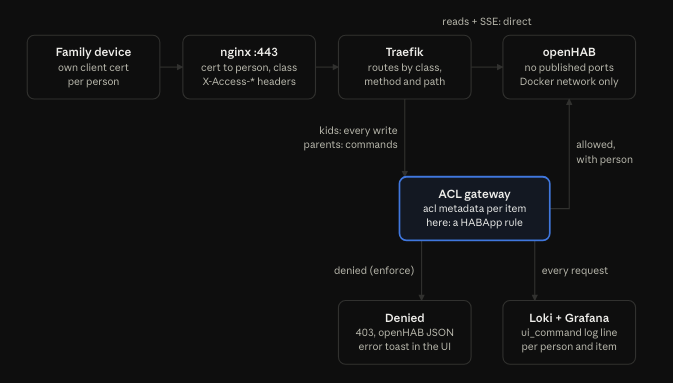
- nginx terminates TLS with
ssl_verify_client optional. Twomaps turn the client-cert fingerprint into a person and an access class:admin(the parents’ devices),user(any other valid cert, i.e. the kids),trusted(internal IPs),none. Both go upstream asX-Access-Class/X-Access-Userand are always overwritten, so a client cannot set them. For classuser, nginx also drops theAuthorizationheader, so a kid cannot smuggle in an API token. - Traefik has two extra routers just above the openHAB catch-all. Family devices: every non-GET/HEAD request and every WebSocket upgrade goes to the gateway. Admin devices: only
POST /rest/items/<item>goes to the gateway, for logging. - The ACL gateway checks the request and forwards allowed commands to openHAB with
?source=org.openhab.ui$<person>. - openHAB has no published ports. Like everything else it runs in a container and is reachable from outside only through nginx and Traefik, so the gateway cannot be bypassed.
What the ACL gateway does
The gateway is an allow-list: a family device may send item commands only where the item’s acl metadata names that person, and nothing else that writes.
Implementation detail: mine is a HABApp rule of under 200 lines on a small aiohttp webserver I had already added to my HABApp setup for webhooks and views, so it was the quickest place to put it. Nothing in the concept depends on it. A small sidecar container in any language would do the same job: take the HTTP request, read the item’s metadata from the REST API, forward or refuse.
For each request it does this:
POST /rest/items/<item>— an item command. Admin devices always pass. For family devices it reads the item’saclmetadata and checks the person, then the allowed commands or numeric range. Allowed commands go to openHAB withsource=org.openhab.ui$<person>, so the event bus shows who sent them.POST /rest/events/states/<connectionId>— the Main UI uses this to tell openHAB which items it wants on its SSE stream. It is read-only, so it passes.- Everything else — rule
runnow, state updates (PUT /rest/items/<item>/state), WebSockets, voice, any admin API — gets a 403 and anui_blockedlog line.
Denied commands come back as a 403 in openHAB’s own error JSON, so the Main UI shows a normal error toast. The gateway fails closed: if it is down, family devices cannot switch anything, but they can still see everything.
Permissions live on the item, in a metadata namespace acl:
# value: people or groups, comma-separated, or "*" for every family member
# config (optional): allowed commands, or a numeric range
value: "kid1"                    # only kid1 may switch this light

value: "kids"
config: { commands: "ON,OFF" }   # no dimming, just on/off

value: "*"
config: { min: 16, max: 23 }     # any family member, setpoint 16–23 °C
Groups and the audit switch are plain config (in my case a HABApp params file):
openhab_gate:
  enforce: false        # false = audit only: denials are logged, the command still passes
  openhab_url: http://openhab:8080
  groups:               # people as named by nginx's $cert_person map
    kids: [kid1, kid2]
    parents: [parent1, parent2]
The core of the check, in Python. The only HABApp-specific call is self.async_oh.get_item, which fetches the item with its metadata from openHAB:
async def _check_acl(self, person: str, item_name: str, command: str) -> str | None:
    """Return why a family member may not send this command, or None if allowed."""
    if not person:
        return "unknown device"
    oh_item = await self.async_oh.get_item(item_name)
    if oh_item is None:
        return "unknown item"
    acl = (getattr(oh_item, "metadata", None) or {}).get("acl")
    if acl is None:
        return "no acl metadata"

    principals = {p.strip().lower() for p in str(acl.get("value", "")).split(",") if p.strip()}
    if not ("*" in principals or person in principals
            or any(person in self._groups.get(p, ()) for p in principals)):
        return f"{person} not in acl '{acl.get('value', '')}'"

    config = acl.get("config") or {}
    # ... then the optional `commands` list and `min`/`max` range
    return None
Two things keep the identity headers honest. nginx always overwrites them, and clears them on port 80 and on the public tunnel ingress. The gateway also answers 403 to any request that carries X-Access-* headers but does not come from the Traefik container.
Audit mode first. I ran with enforce: false first. Every command is logged with decision=allowed|would_deny|denied, but nothing was blocked yet. That showed me what the kids actually use before I write the ACLs, instead of guessing and breaking their favourite switch.
Seeing who switched what
Every UI command now ends up as one logfmt line, which turned out to be the most useful part so far. The gateway logs it, HABApp ships it to Loki via GELF, and a Grafana dashboard shows it per person. Three made-up example lines:
ui_command person=kid1 access_class=user item=LivingRoom_Light label="Wohnzimmer Licht" command=ON decision=would_deny reason="no acl metadata" status=200
ui_command person=parent1 access_class=admin item=Heating_Mode label=Heizung command=AUTO decision=allowed status=200
ui_blocked person=kid2 access_class=user method=POST path=/rest/rules/abc123/runnow reason="not an allowed write request"
The dashboard has four panels: commands per person for the selected range, commands over time, a table of every command (person, item, label, command, decision), and the blocked non-command requests. Its Loki query is short, because logfmt does the parsing:
{host="HABApp", logger="RuleLoggers.OpenhabGate"} |= "ui_command"
  | json msg="short_message"
  | line_format `{{ trimPrefix "ui_command " .msg }}`
  | logfmt
  | person=~"$person" | decision=~"$decision"
The source=org.openhab.ui$<person> parameter also puts the person into openHAB’s own event log, so any rule that looks at the command source can tell who it was.
Lessons learned and limits
- Everything runs in containers, nginx is the only way in. openHAB, the gateway, Traefik and the rest run in Docker. openHAB has no published ports; from outside, the only entry point is nginx with mTLS. That is what makes the gateway a real checkpoint.
- Know the write surface. I traced what the clients actually use. The Main UI and the native iOS app get live updates via SSE (
/rest/events/states) and send commands only asPOST /rest/items/<item>. WebSockets (/ws) were only used by HABApp, my MCP tooling and the admin log viewer. That made a short allow-list possible. implicitUserRoleis wider than it sounds. Without a login, theuserrole can send commands, update states, run rules and use the voice interpreters — with an LLM-backed interpreter, that is quite a lot. With the gateway in front, none of that is reachable from a family device.- The identity is only as good as the cert. A lost phone carries that person’s rights until I remove its fingerprint. Internal IPs (
trusted) and admin devices are never restricted, only logged. - It fails closed. If the gateway is restarting, the kids cannot switch for a few seconds. That is the trade-off I want.
- The UI does not know about the ACLs. A kid still sees every switch, and a denied tap shows an error toast. For us that is fine; reading is explicitly allowed.
Next steps: watch the audit dashboard for a week or two, write the acl metadata from what the kids actually use, then switch to enforce: true.
Questions for you
- To the people behind openhab-multiuser-proxy: is gating only writes enough in your households, or what made you filter reads as well?
- Did I miss a write path the
userrole has? Basic UI and sitemaps are the ones I have not traced. visibleTowith custom roles was suggested for hiding widgets. Does that work for clients that are not logged in to openHAB, where the identity comes only from the proxy?- Is per-item authorization planned anywhere in openHAB core?
- Would a cleaned-up, standalone version of the gateway (a small sidecar container plus example proxy configs) be useful to anyone?
Happy to share more config or answer questions.