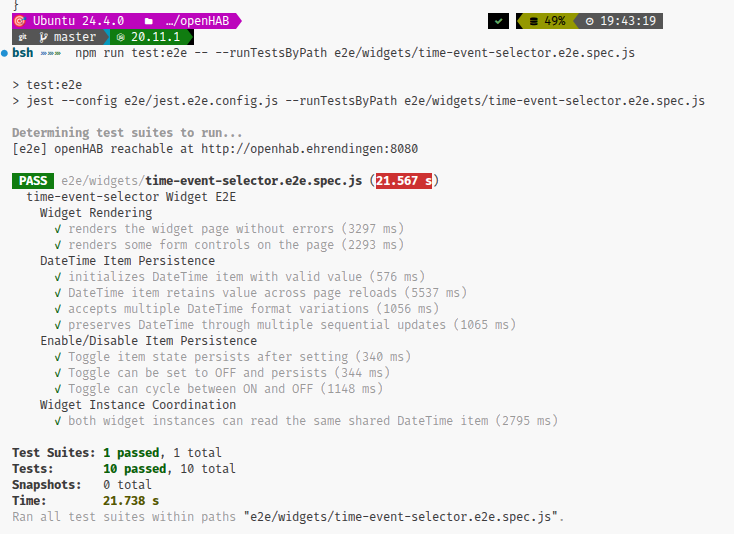
Hi all,
as I’m using openHAB since more than 10 year regressions problems, and troubleshooting after upgrades are well known to me. So - as I tried to leverage AI agents to create a system to create testable rules and widgets - and I’m quite happy with the result. As usual, my time is very limited - especially as I want to finish the Jellyfin binding to make it available to all users (locally it is under testing with 5.1.2) …

So I dared to task the AI to describe the setup - not ideal maybe, but I hope it serves as an inspiration on how to achieve a stable setup over time; and preferred to not sharing the idea at all.
Note: There are quite some simplifications in the summary - as the whole container, network setup and AI agent setup is omitted.
with kind regards,
Patrik
And now I give the word to Claude:
Note: This article was automatically generated with AI. The rule modifications, tests, and troubleshooting workflows themselves are developed and refined using AI agents as coding partners. The approach documented here reflects our operational practices, not necessarily universal “best practices.”
Introduction
Home automation rules are complex. They integrate multiple devices, handle edge cases, and run 24/7 with minimal supervision. Yet many openHAB users manage rules the way they manage configuration files—manually, with minimal testing, and with limited visibility into execution.
Our Setup: 90 production rule files, 6 shared library modules, 92 unit tests—all deployed and managed using the testing and deployment pipeline described below.
This article describes our approach: automated regression testing with Jest, system endpoint testing with Puppeteer, live interaction via the openHAB REST API, and interactive troubleshooting with Karaf. Each tool addresses a specific part of the development lifecycle.
Overview: The Rule Development Workflow
Rule Code (JavaScript)
    ↓
🧪 Local Unit Tests (Jest)
    ↓
🤖 System Integration Tests (Puppeteer + REST API)
    ↓
🚀 Deploy to openHAB
    ↓
🔍 Live Troubleshooting (Karaf Console)
Each tool serves a specific purpose:
- Jest → unit tests catch logic errors before deployment
- Puppeteer + REST API → integration tests validate end-to-end behavior
- Karaf → interactive debugging when things go wrong
Part 1: Regression Testing with Jest
Jest runs unit tests in milliseconds without requiring an openHAB instance. It handles the core logic layer: parsing, decision-making, state coordination. openHAB injects runtime globals (items, rules, events), so tests mock these to isolate the code under test.
Test Structure: Unit Tests vs. Integration Tests
Unit Tests: Testing Pure Logic
Unit tests validate individual functions—the core logic that should work independently of openHAB’s runtime.
Key techniques:
- Mock
items.getItem()to return test data without a server - Mock
require()to provide isolated dependencies - Test error paths aggressively (missing items, corrupt state, null checks)
Why this works: openHAB’s global objects are injected at runtime. By mocking them, you can run the same code in Jest that runs in openHAB.
Integration Tests: Testing System Interaction
Integration tests (suffix .e2e.spec.js) connect to a real openHAB instance and verify end-to-end behavior. They answer: does this rule actually work when a trigger fires?
They’re slower but catch integration issues:
- Item naming mistakes
- Missing metadata
- REST API failures
- Dependency load failures
Setup: Package Configuration
Configure Jest for openHAB Rule Testing
package.json:
{
  "scripts": {
    "test": "jest --testPathIgnorePatterns '\\.e2e\\.spec\\.js$'",
    "test:watch": "jest --watch",
    "test:e2e": "jest --testMatch='**/*.e2e.spec.js'",
    "test:all": "npm test && npm run test:e2e"
  },
  "devDependencies": {
    "jest": "^30.2.0",
    "puppeteer": "^24.37.2"
  }
}
This configuration separates unit tests (suffix .spec.js) from end-to-end tests (suffix .e2e.spec.js), allowing you to run them independently.
jest.config.js:
module.exports = {
  testEnvironment: "node",
  coverageThreshold: {
    global: {
      branches: 60,
      functions: 60,
      lines: 60,
      statements: 60
    }
  }
};
Running Tests:
npm test              # Run unit tests only
npm run test:watch   # Continuous testing as you edit
npm run test:e2e     # Run end-to-end tests (requires openHAB instance)
npm run test:all     # Run everything
Sample Test Run Output:
 PASS  rules/stale-monitor.spec.js
  Stale Monitor
    ✓ identifies items without recent updates (45ms)
    ✓ creates alerts for stale items (32ms)
    ✓ handles missing items gracefully (12ms)
    ✓ ignores exempted items (8ms)

Test Suites: 1 passed, 1 total
Tests:       4 passed, 4 total
Snapshots:   0 total
Time:        3.425s

Coverage summary:
  Stmts   : 87.3% ( 62/71 )
  Branch  : 84.5% ( 49/58 )
  Funcs   : 100% ( 8/8 )
  Lines   : 87.1% ( 61/70 )
Testing Approach: Mocking and Isolation
Mock Setup and Test Structure
Mocking openHAB Global Objects:
Create mocks that provide items, rules, events, and other runtime globals:
// __mocks__/mock-items.js
global.items = {
  getItem: jest.fn((name) => ({
    state: "ON",
    postUpdate: jest.fn(),
    sendCommand: jest.fn()
  }))
};
IIFE-Wrapped Module Pattern:
Rules wrapped in IIFE for testability export functions explicitly:
if (typeof module !== "undefined" && module.exports) {
  module.exports = { checkStaleItems, calculateDuration };
}
Then import them in tests:
const { checkStaleItems } = require("./stale-monitor.js");
Error Path Testing:
Home automation is 24/7. Error paths matter:
- Item doesn’t exist → graceful fallback
- Malformed JSON state → catch and log
- Required module isn’t deployed → fail fast with clear error
- NULL/UNDEF state → handle in logic
Test these explicitly.
Part 2: End-to-End Testing with REST API and Puppeteer
Integration tests validate the full lifecycle: command → item updates → rule triggers → side effects occur. The REST API and Puppeteer are the test interfaces to a real openHAB instance.
Using the REST API for Integration Tests
The openHAB REST API provides endpoints for items, rules, and logs. From Node.js:
// Get item state
const getItemState = async (itemName) => {
  const response = await fetch(`http://localhost:8080/rest/items/${itemName}`);
  return response.json();
};

// Trigger a rule
const triggerRule = async (ruleUid) => {
  return fetch(`http://localhost:8080/rest/rules/${ruleUid}/runnow`, {
    method: "POST"
  });
};
These calls simulate what a user’s dashboard or external system would do. They verify rules respond correctly to real events.
Puppeteer for UI Testing
Puppeteer automates a browser to test dashboards and sitemap pages. Key techniques:
page.goto()→ navigate to openHABpage.click()→ simulate user interactionpage.waitForFunction()→ wait for async state updatespage.$eval()→ query and verify DOM content
The pattern is: send a REST command → wait for UI to update → verify the change is visible:
// E2E: Verify UI reflects item state change
await fetch(`http://localhost:8080/rest/items/Light`, {
  method: "POST",
  body: "ON"
});

await page.waitForFunction(() => {
  const element = document.querySelector("[data-item='Light']");
  return element?.textContent.includes("ON");
});
This catches issues that pure API tests miss: slow UI updates, missing bindings, incorrect state formatting.
Part 3: Deployment: Rules vs. Libraries
openHAB rules and shared libraries are deployed using fundamentally different mechanisms. This distinction matters: it affects how you structure code, how you test, and how you troubleshoot.
Architecture: How Tests Feed into Deployment
Before any code reaches openHAB, the deployment system performs comprehensive sanity checks:
Source Code (rules/*.js + metadata, lib/*.js)
    ↓
🧪 [Test Assert] npm test - unit tests, error paths, edge cases
    ↓
✔️  [Sanity Check] Verify GraalVM compatibility (JSDoc + IIFE incompatibility)
    ↓
✔️  [Sanity Check] Verify dependencies exist (all required shared modules)
    ↓
✔️  [Sanity Check] Verify metadata IDs are present (triggers, actions must have IDs)
    ↓
[Rules] 🔧 Strip IIFE wrapper + construct REST payload with metadata
[Libs] 📦 rsync to node_modules with checksum verification
    ↓
🚀 REST API POST/PUT with proper action/trigger configuration
    ↓
✔️  [Sanity Check] Verify rule status transitions to IDLE (not UNINITIALIZED)
    ↓
✅ [Production] Enable rule
Shared Libraries: rsync Deployment with Verification
Shared libraries (modules in lib/) deploy via rsync to the remote openHAB server’s node_modules directory:
Library Deployment Mechanism
Structure:
Local:  lib/openhab-utils.js
Remote: conf/automation/js/node_modules/openhab-utils/index.js
The .js file goes live with:
- Directory creation (
mkdir -p node_modules/<module-name>) - Automatic backup of existing file
 SHA256 checksum verification (integrity check)
- Retry logic with configurable attempts
Deployment:
sync-shared-module.sh openhab-utils
Checksum Verification:
sha256sum lib/openhab-utils.js                    # Local
ssh openhab-host sha256sum .../openhab-utils/index.js  # Remote
If checksums don’t match, deployment retries automatically.
Rules: IIFE Stripping and REST API Deployment
Rules require transformation:
- IIFE wrapper stripped (added for Jest, not needed in openHAB)
- Metadata merged (triggers, actions, tags from JSON)
- IDs generated for triggers and actions
- REST payload constructed with proper structure
- GraalVM cache cleared (delete/recreate)
The IIFE Pattern and Stripping Process
IIFE Structure:
Local development wraps rules in IIFE so they work in Node.js:
// Source: rules/alert-stale-items.js (works in Jest)
((exports) => {
  ("use strict");

  const { safeGetItem } = require("openhab-utils");

  const checkStaleItems = () => {
    // ... implementation ...
  };

  // Export for Jest
  if (exports) {
    exports.checkStaleItems = checkStaleItems;
  }

  // Execute in openHAB when triggered
  if (typeof event !== "undefined") {
    checkStaleItems();
  }
})(typeof module !== "undefined" ? module.exports : null);
Deployment Strip:
GraalVM has a quirk: if a /** JSDoc */ precedes IIFE ((, execution skips silently. Solution: strip the IIFE before deployment.
// After stripping (deployed to openHAB)
("use strict");

const { safeGetItem } = require("openhab-utils");

const checkStaleItems = () => {
  // ... implementation ...
};

checkStaleItems();  // Direct call, no IIFE wrapper
Metadata Separation and ID Generation
Metadata File (rules/{uuid}.metadata.json):
{
  "uid": "012d853fc5",
  "name": "Monitor Stale Items",
  "triggers": [
    {
      "type": "timer.GenericCronTrigger",
      "configuration": { "cronExpression": "0 */5 * * * ?" }
    }
  ]
}
Transformation for REST:
The deployment script:
- Reads triggers from metadata
- Generates sequential IDs: “1”, “2”, etc.
- Strips IIFE from rule code
- Builds REST payload with action ID = trigger_count + 1
Generated Payload:
{
  "uid": "012d853fc5",
  "triggers": [
    {
      "id": "1",
      "type": "timer.GenericCronTrigger",
      "configuration": { "cronExpression": "0 */5 * * * ?" }
    }
  ],
  "actions": [
    {
      "id": "2",
      "type": "script.ScriptAction",
      "configuration": {
        "type": "application/javascript",
        "script": "(...rule code without IIFE...)"
      }
    }
  ]
}
IDs must be unique. Numbering triggers 1..N and actions starting at N+1 guarantees this.
GraalVM Cache Bypass Strategy
GraalVM caches compiled bytecode. Old code keeps running unless the cache is cleared.
Pattern: Delete then Recreate
DELETE existing rule  → clears bytecode cache
Wait 3 seconds        → allow cache to clear
CREATE new rule       → REST API POST
Verify IDLE status    → not UNINITIALIZED
Enable rule           → activate
This ensures fresh bytecode, not stale cache.
Pre-Deployment Sanity Checks
Before any REST API call, the deployment script validates:
| Check | Failure Mode |
|---|---|
| Files exist | Obvious error, deployment stops |
| Tests pass | Catch logic errors in Jest before live |
| Dependencies deployed | Missing library → require() fails at runtime |
| Trigger/action IDs present | Missing IDs → rule status UNINITIALIZED |
| Action type is correct | Must be script.ScriptAction, not application/javascript |
| No GraalVM incompatibilities | JSDoc+IIFE pattern → silent execution skip |
| Server responds | API accessible, auth valid |
| Rule reaches IDLE | Indicates successful initialization |
Example: Missing Dependency Check
# Verify required modules are deployed
for module in openhab-utils alert-tracker multimedia-constants; do
  if grep -q "require('$module')" rules/012d853fc5.js; then
    ssh openhab-host ls conf/automation/js/node_modules/$module/index.js || {
      echo "❌ Module not deployed: $module"
      exit 1
    }
  fi
done
Live Interaction: REST API for Testing and Monitoring
After deployment, the REST API is your window into rule execution:
# 🚀 Trigger a rule manually
curl -X POST http://localhost:8080/rest/rules/012d853fc5/runnow

# 🔍 Check rule status
curl http://localhost:8080/rest/rules/012d853fc5 | jq '.statusInfo'

# 📋 List all rules and their status
curl http://localhost:8080/rest/rules | jq '.[] | {uid, name, enabled, statusInfo}'
// After stripping: rules/alert-stale-items.js (deployed to openHAB)

("use strict");

const alertTracker = require("alert-tracker");
const { safeGetItem } = require("openhab-utils");

const checkStaleItems = () => {
  // ... implementation ...
};

// Direct call (openHAB rule engine triggers this)
checkStaleItems();
How Stripping Works:
The deployment script uses Python regex to detect and remove the IIFE:
-
Arrow IIFE:
((exports) => { ... })(...)- Removes the outer wrapper
- Removes the inner
if (exports) { ... }export block - Replaces the
if (typeof event !== "undefined") { runRule(); }guard with direct call
-
Function IIFE:
(function () { ... })()- Removes wrapper; inner code is already direct
If neither pattern is detected, code passes through unchanged (for rules that don’t use IIFE).
Metadata Separation and ID Generation
Metadata File Structure (rules/{category}/{uid}.metadata.json):
{
  "uid": "012d853fc5",
  "name": "Monitor Stale Items",
  "description": "Detects items without recent updates",
  "tags": ["monitoring", "alert"],
  "triggers": [
    {
      "type": "timer.GenericCronTrigger",
      "configuration": {
        "cronExpression": "0 */5 * * * ?"
      }
    }
  ]
}
The Transformation (before REST deployment):
The deployment script:
- Reads triggers from metadata
- Generates sequential IDs: trigger 1, trigger 2, etc. (openHAB requirement)
- Reads rule script from
.jsfile - Strips IIFE wrapper from script content
- Constructs action with script and proper type (
script.ScriptAction) - Generates final JSON for REST API
// Generated for REST API (not stored in version control)
{
  "uid": "012d853fc5",
  "name": "Monitor Stale Items",
  "triggers": [
    {
      "id": "1",  // ← Generated ID
      "type": "timer.GenericCronTrigger",
      "configuration": { "cronExpression": "0 */5 * * * ?" }
    }
  ],
  "actions": [
    {
      "id": "2",  // ← Generated (trigger_count + 1), ensures uniqueness
      "type": "script.ScriptAction",
      "configuration": {
        "type": "application/javascript",
        "script": "('use strict');\nconst alertTracker = require('alert-tracker');\n..."
      }
    }
  ]
}
Why separate metadata?
- Version control: Metadata (triggers, tags) is data, not code
- Readability: Rule logic stays clean; configuration is separate
- Flexibility: Change triggers or tags without editing rule code
- Safety: Metadata structure is validated before deployment
GraalVM Cache Bypass Strategy
GraalVM caches compiled JavaScript bytecode. When you redeploy a rule, the cache often isn’t cleared, so openHAB executes old code.
Solution: Delete then recreate the rule.
1. DELETE existing rule (clears GraalVM bytecode cache)
   curl -X DELETE http://localhost:8080/rest/rules/012d853fc5

2. Wait 3 seconds (allow cache to clear)
   sleep 3

3. CREATE new rule with REST API
   curl -X POST http://localhost:8080/rest/rules \
     -H "Content-Type: application/json" \
     -d @rule-payload.json

4. Verify status is IDLE (not UNINITIALIZED)
   curl http://localhost:8080/rest/rules/012d853fc5
   → should show: "statusInfo": {"status": "IDLE"}

5. Enable if needed
   curl -X PUT http://localhost:8080/rest/rules/012d853fc5 \
     -H "Content-Type: application/json" \
     -d '{"enabled": true}'
This pattern ensures GraalVM uses fresh bytecode, not stale cache.
Pre-Deployment Sanity Checks
The deployment script performs critical validation before any REST API call:
| Check | Why | Failure Mode |
|---|---|---|
| File exists | Rule JS and metadata files must exist | Obvious error; stops deployment |
| Tests pass | Catch logic errors before going live | Silent bugs if skipped |
| Dependencies deployed | Required libraries must exist on server | require() fails at runtime with “module not found” |
| Trigger/action IDs present | IDs are required by openHAB rule schema | Rule status: UNINITIALIZED (silent failure) |
| Action type correct | Must be script.ScriptAction, not application/javascript |
Rule status: UNINITIALIZED |
| No GraalVM incompatibilities | Detects JSDoc+IIFE pattern that causes silent skip | Rule loads but never executes |
| Server responds | API accessible, authentication works | HTTP errors during deployment |
| Rule reaches IDLE status | Indicates successful initialization | Rule loads but may not execute |
Example: Missing Dependency Check
# Check if required modules are deployed
for module in openhab-utils alert-tracker multimedia-constants; do
  if grep -q "require('$module')" rules/012d853fc5.js; then
    # Verify module exists on server
    ssh openhab-host ls conf/automation/js/node_modules/$module/index.js || {
      echo "❌ Module not deployed: $module"
      exit 1
    }
  fi
done
If a rule requires alert-tracker but it hasn’t been synced yet, deployment stops with a clear error message.
Live Interaction: REST API for Testing and Monitoring
Once deployed, the REST API is your window into rule execution:
Trigger a rule manually (for testing):
curl -X POST http://localhost:8080/rest/rules/012d853fc5/runnow
Check rule status:
curl http://localhost:8080/rest/rules/012d853fc5 | jq '.statusInfo'
# Returns: { "status": "IDLE" } or { "status": "ERROR", "description": "..." }
List all rules and their status:
curl http://localhost:8080/rest/rules | jq '.[] | {uid, name, enabled, statusInfo}'
These calls work during development, testing, and production monitoring. When issues arise, Karaf console provides direct access to inspect item states, monitor logs, and analyze rule execution.
Tools Summary
| Tool | Purpose | When to Use |
|---|---|---|
| Jest | Unit test rule logic | During development, before commit |
| Puppeteer | Test UI and end-to-end flows | Before deployment, for regression tests |
| REST API | Deploy, trigger, inspect, monitor | Live system interaction and testing |
| Karaf | Interactive debugging | Troubleshoot production issues, inspect state |
Example: Rule Structure with IIFE and Tests
Here’s how a production rule is structured:
Complete Rule Example
Source: rules/stale-monitor.js (testable in Jest, deployable to openHAB)
// IIFE for testability
((exports) => {
  ("use strict");

  const { safeGetItem } = require("openhab-utils");

  const checkStaleItems = () => {
    // Rule logic here
  };

  // Export for Jest tests
  if (exports) {
    exports.checkStaleItems = checkStaleItems;
  }

  // Execute when triggered by openHAB
  if (typeof event !== "undefined") {
    checkStaleItems();
  }
})(typeof module !== "undefined" ? module.exports : null);
Unit Test: rules/stale-monitor.spec.js
Tests run locally without an openHAB instance:
describe("Stale Monitor", () => {
  const { checkStaleItems } = require("./stale-monitor.js");

  it("should identify items without recent updates", () => {
    // Mock items
    global.items = { getItem: jest.fn(...) };

    // Run the logic
    checkStaleItems();

    // Verify behavior
    expect(...).toBe(...);
  });
});
Metadata: rules/stale-monitor.metadata.json
{
  "uid": "stale-monitor-rule",
  "name": "Monitor Stale Items",
  "triggers": [{
    "type": "timer.GenericCronTrigger",
    "configuration": { "cronExpression": "0 */5 * * * ?" }
  }]
}
Deployment process:
# 1. Tests automatically verified
npm test -- rules/stale-monitor.spec.js

# 2. IIFE stripped, metadata merged, REST payload constructed
deploy-rule.sh stale-monitor

# 3. Rule deploys with fresh bytecode, runs in openHAB
When deployed, the IIFE wrapper is stripped away, leaving only the executable logic. The metadata file provides triggers and configuration. The deployment script performs all sanity checks (dependencies exist, IDs are valid, GraalVM compatibility verified) before sending the REST payload.
Conclusion
This approach—unit testing with Jest, integration testing with REST API and Puppeteer, transformation-based deployment with IIFE stripping, and interactive troubleshooting via Karaf—is what works operationally for us.
The stack enables:
 Rules tested locally before deployment
 Comprehensive validation gate before REST API calls
 Automated IIFE stripping and GraalVM cache bypass
 Direct REST API interaction for live debugging
 Karaf console for production troubleshooting
The result: fewer runtime surprises, faster iteration, and less time spent guessing what went wrong.
Quick Reference: Command Cheat Sheet
Commands and Workflows
Local Development:
npm test             # 🧪 Run unit tests
npm run test:watch   # 👀 Watch mode
npm run test:e2e     # 🤖 Integration tests
npm run test:all     # 🎯 Everything
Deployment:
sync-shared-module.sh openhab-utils    # 📦 Deploy library
deploy-rule.sh rules/stale-monitor     # 🚀 Deploy rule
REST API (Bash examples):
# Get item state
curl http://localhost:8080/rest/items/ItemName

# Send command
curl -X POST -H "Content-Type: text/plain" \
  --data "ON" http://localhost:8080/rest/items/ItemName

# Trigger rule
curl -X POST http://localhost:8080/rest/rules/<uid>/runnow

# Check rule status
curl http://localhost:8080/rest/rules/<uid> | jq '.statusInfo'
Karaf Console (SSH to port 8101):
item:watch                # 👀 Watch all item changes
log:tail -f               # 📋 Stream logs
rule:list                 # 📝 List all rules
item:status LightName     # 🔍 Single item state
log:set DEBUG org.openhab.core.automation  # 🐛 Debug rules