1. What steps are necessary for a complete migration? 1. Is there already a guide for this?
Some comments on 1):
I know that openHabian has “50 - backup/restore.” However, I’m also aware that this won’t migrate everything on my “openHabian” server. There is no additional/manually installed software there. However, there is software installed there that I installed in openHabian as “Optional Components.”
This raises further questions about 1): Is there a way to include the “optional components” in “backup/restore”?
I definitely have mosquitto installed and would like to migrate that as well.
I might have installed “Grafana and InfluxDB” (I still need to check). I can view my temperature data as a graph. This might be based on “Grafana and InfluxDB.”
It also occurs to me that other system configurations, such as the IP address and hostname, should be adopted. Are there any other things I should consider?
If I understand correctly, you can’t (but I’m not an openHAbian expert). openHABian is installed on “bare metal” similar to an operating system.
You need to reimage a SD card with the appropriate openHABian image for the Rpi5 and OH5, then use the openhabian-config to readd your optional components (samba, MQtt, etc.) and the OH backup etc.
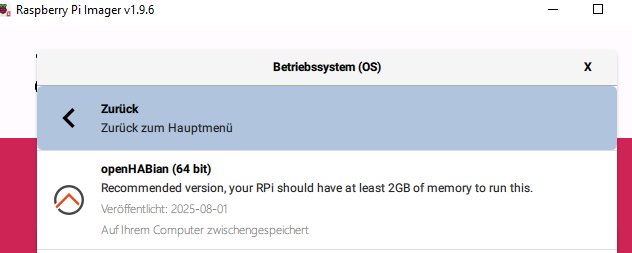
Install the latest openHABian on the RPi 5. Make sure you choose the 64-bit OS image.
Reinstall and configure the third party tools you installed through openhabian-config and transfer the data and configs for each one over to the RPi 5 individually as necessary.
Reinstall openHAB so it matches the version of OH you are running on the RPi 3.
Take a backup of OH from the RPi 3 and restore it on the RPi 5.
Validate the restore worked as expected.
Upgrade OH to the latest OH 5 release. You may need to upgrade to Java 21 separately.
There are several posts but I know of no hardware migration tutorial like this.
No.
Unless you changed things, simply installing Mosquitto on the RPi 5 using openhabian-config will be sufficient. openhabian-config also deploys a default configuration.
To migrate these you’ll have to look on the Grafana and InfluxDB docs to see how to migrate those. Note that just because you have charts doesn’t mean you are using these. MainUI has good support for charts built in which work is rrd4j or any other persistence database. Sitemaps also have support for a more primitive charting capability. Just because you see charts doesn’t necessarily mean you are using these. You should be able to tell by looking at your persistence configs and your sitemap or MainUI widgets.
You should not have two machines on the network with the same IP address at the same time. It’s a good idea to avoid having duplicate host names too. You will probably want to keep the RPi 3 up and running until you’ve completed the migration and confirmed everything works, so I would not try to change these until after you decomission the RPi 3, if at all.
You can’t use SD card mirroring or other approaches that just copy everything off the SD card because you are almost certainly running a 32-bit OS on that RPi 3 and OH 5 requires a 64-bit OH meaning you’ll have to start over and reinstall everything anyway.
In this case yes that is true but it’s because OP is almost certainly running a 32-bit OS and OH 5 requires a 64-bit OS.
However, openHABian is just a bunch of scripts that run during that first boot and which can be run individually from openhabian-config. If the RPi 3 were running a 64-bit OS, it is likely possible to just take the SD card from the RPi 3 and plug it into the RPi 5 and everything will work. Raspberry Pi OS, which openHABian runs on, is fully backwards and forward compatible to every model of RPi that was available when the OS was released.
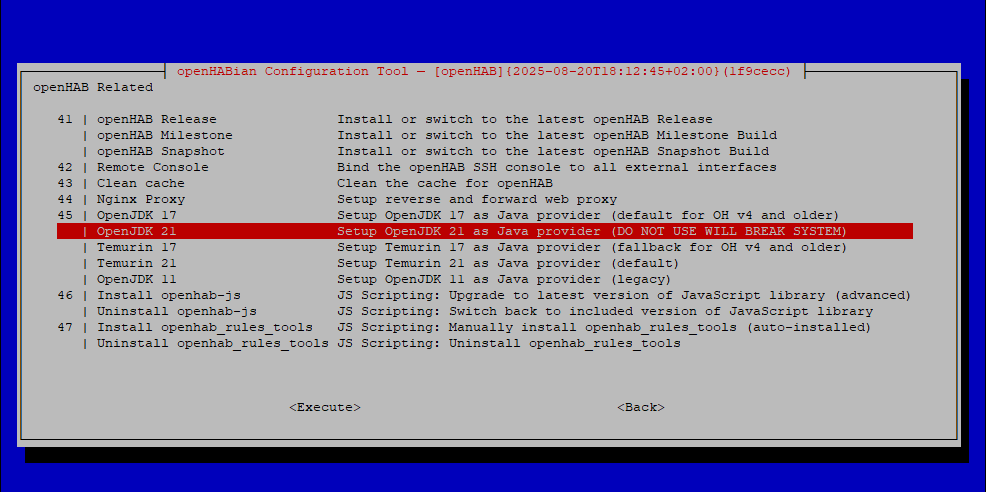
It says right there in the menu “DO NOT USE WILL BREAK SYSTEM”.
“Temurin 21” is what would should have chosen. OpenJDK is currently not supported.
I don’t know that this would cause that warning message or not. If that message appears when choosing OpenJDK, the contents of the error message needs to be updated. If not, you’ve two problems.
I’ve only an older version of openHABian to check against but I expected to see “Raspian” instead of “Debian” in the uname results. But that may have changed since I last upgraded this machine (it’s 100 miles away so upgrades are few and far between).
here you are… some action of yours messed this file up, maybe the openjdk21 move as it’s probably from the unstable repo.
Shouldn’t happen when you use openHABian properly.
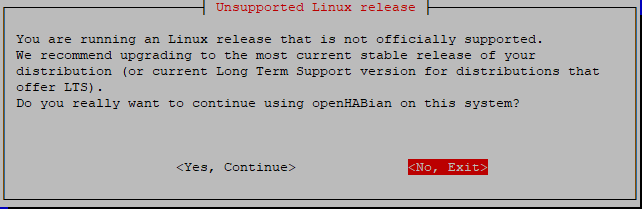
It sounds like you are somehow on the testing version of Debian which is not supported so the warning is correct. If everything is working you can probably live with the warning but realize we are limited in how well we can support you.
Or you’ll need to start over and this time choose Temeruin.
For a safe solution, you need to reinstall from scratch.
You don’t know what caused this mess-up, and you don’t know what else (undiscovered) is messed up in your OS, too.
I took another look. The stable branch of Debian 12 / Bookworm / Raspberry Pi OS apparently (unfortunately) doesn’t include version 21 of openJDK. (It would certainly be technically feasible to replicate this.) Therefore, the openHABian script (logically) imports the unstable branch when installing openJDK. This then leads to the “forky/sid” situation.
I hadn’t anticipated the consequences. I naively assumed that you could simply uninstall unsupported Java. Not a big deal, I’ll repeat the installation.
Installing the unstable openjdk pk should not change the whole system’s distro status, that’s what’s broken. Thing is, we as openHABian maintainers cannot validate that, and it can change at any time.
That’s why there is that warning in the openHABian menu not to use it.
I can confirm that it is not necessary to install OH 4.3 on a new Raspberry Pi 5 before upgrading. I just did the following steps and all worked like a charm:
Put all things as “disabled” on the RPI 3
Make a backup of the configuration: openhab-cli backup
Install OH 5.0 on a new Raspberry PI 5 with openhabian OS on a new SD card
Boot up Openhab 5 and let Openhabian finish all the first boot steps (takes several minutes, monitor the screen) - at the end, the Rpi reboots.
Copy the backup file in the backup folder /var/lib/openhab/backups/
Restore the backup from the openhabian-config tool
(Connects you USB sticks such as Zwave, Zigbee, etc.)
Re-enable the things and check that all is fine with each binding
In case of failure with the new RPi 5 with a new sd card, keeping the RPi 3 with the old sd card is a safe option, as it can be relaunched in few minutes.