
Migration from OpenHab 4.3 to latest OpenHab 5 (release): Blockly rules break because of different behaviour of comparison operator for numerical values that are NULL

After performing the upgrade (had to install fresh openhabian because of 64bit architecture requirement, imported config backup via openhabian-config), my presence detection rules implemented via Blocky/javascript were all broken since (as I found out when debugging this) now “<“ comparisons on numerical values seem to default to “TRUE” when the numerical value is NULL and the comparison is with a number > 0 (for a simple replication not covering all cases, please see below). First checking whether the value is not equal to NULL fixes this. Seems a weird and possibly unsafe behaviour. Am I missing anything? Have others observed similar issues? Tx!

Update: OK, I can reproduce this with minimal dependencies:

configuration: {}
triggers:
  - id: "1"
    configuration:
      itemName: TestItem
    type: core.ItemStateChangeTrigger
conditions: []
actions:
  - inputs: {}
    id: "2"
    configuration:
      type: application/javascript
      blockSource: '<xml
        xmlns="https://developers.google.com/blockly/xml"><variables><variable
        type="Number"
        id="fd+ewqTn!*-[L/Fz,0bu">myNumber</variable></variables><block
        type="math_number" id="s4DKh?qSp1oUzYt=cipK" x="402" y="29"><field
        name="NUM">100</field></block><block type="variables_set_dynamic"
        id="#s%I.$oGr]6W?6=.Ep+9" x="200" y="69"><field name="VAR"
        id="fd+ewqTn!*-[L/Fz,0bu" variabletype="Number">myNumber</field><value
        name="VALUE"><block type="logic_null"
        id="9q?6j.#~2c9*LFj.}KB7"></block></value><next><block
        type="controls_if" id="wquz#w2Viep:Vh(]ROey"><mutation
        else="1"></mutation><value name="IF0"><block type="logic_compare"
        id="]mR}%T[T/F5toaN)APMj"><field name="OP">LT</field><value
        name="A"><block type="variables_get_dynamic"
        id="F]%kWbq;zKzeqDG,dXcP"><field name="VAR" id="fd+ewqTn!*-[L/Fz,0bu"
        variabletype="Number">myNumber</field></block></value><value
        name="B"><block type="math_number" id="A;n$TCGAAthgJr:a=?)!"><field
        name="NUM">99</field></block></value></block></value><statement
        name="DO0"><block type="oh_log" id="dX|,?}7/A3M$)^eU5V4l"><field
        name="severity">warn</field><value name="message"><shadow type="text"
        id="IQ$ogy)-,-REdzt}JO8%"><field name="TEXT">abc</field></shadow><block
        type="text" id="2389xU6~7my/S3NK/B2O"><field name="TEXT">Test: Comparson
        was TRUE</field></block></value></block></statement><statement
        name="ELSE"><block type="oh_log" id="W%FNj9wb0(rfvRDM?wtR"><field
        name="severity">warn</field><value name="message"><shadow type="text"
        id="IQ$ogy)-,-REdzt}JO8%"><field name="TEXT">abc</field></shadow><block
        type="text" id="a4-zFG_sS1/yDvLjs?cN"><field name="TEXT">Test: Comparson
        was
        FALSE</field></block></value></block></statement></block></next></block></xml>'
      script: |
        var myNumber;


        100;

        myNumber = null;
        if (myNumber < 99) {
          console.warn('Test: Comparison was TRUE');
        } else {
          console.warn('Test: Comparison was FALSE');
        }
    type: script.ScriptAction

logs “Test: Comparison was TRUE”…

whereas this

configuration: {}
triggers:
  - id: "1"
    configuration:
      itemName: TestItem
    type: core.ItemStateChangeTrigger
conditions: []
actions:
  - inputs: {}
    id: "2"
    configuration:
      type: application/javascript
      blockSource: '<xml
        xmlns="https://developers.google.com/blockly/xml"><variables><variable
        type="Number"
        id="fd+ewqTn!*-[L/Fz,0bu">myNumber</variable></variables><block
        type="variables_set_dynamic" id="#s%I.$oGr]6W?6=.Ep+9" x="200"
        y="69"><field name="VAR" id="fd+ewqTn!*-[L/Fz,0bu"
        variabletype="Number">myNumber</field><value name="VALUE"><block
        type="math_number" id="s4DKh?qSp1oUzYt=cipK"><field
        name="NUM">100</field></block></value><next><block type="controls_if"
        id="wquz#w2Viep:Vh(]ROey"><mutation else="1"></mutation><value
        name="IF0"><block type="logic_compare" id="]mR}%T[T/F5toaN)APMj"><field
        name="OP">LT</field><value name="A"><block type="variables_get_dynamic"
        id="F]%kWbq;zKzeqDG,dXcP"><field name="VAR" id="fd+ewqTn!*-[L/Fz,0bu"
        variabletype="Number">myNumber</field></block></value><value
        name="B"><block type="math_number" id="A;n$TCGAAthgJr:a=?)!"><field
        name="NUM">99</field></block></value></block></value><statement
        name="DO0"><block type="oh_log" id="dX|,?}7/A3M$)^eU5V4l"><field
        name="severity">warn</field><value name="message"><shadow type="text"
        id="IQ$ogy)-,-REdzt}JO8%"><field name="TEXT">abc</field></shadow><block
        type="text" id="2389xU6~7my/S3NK/B2O"><field name="TEXT">Test: Comparson
        was TRUE</field></block></value></block></statement><statement
        name="ELSE"><block type="oh_log" id="W%FNj9wb0(rfvRDM?wtR"><field
        name="severity">warn</field><value name="message"><shadow type="text"
        id="IQ$ogy)-,-REdzt}JO8%"><field name="TEXT">abc</field></shadow><block
        type="text" id="a4-zFG_sS1/yDvLjs?cN"><field name="TEXT">Test: Comparson
        was
        FALSE</field></block></value></block></statement></block></next></block><block
        type="logic_null" id="9q?6j.#~2c9*LFj.}KB7" x="395"
        y="98"></block></xml>'
      script: |
        var myNumber;


        myNumber = 100;
        if (myNumber < 99) {
          console.warn('Test: Comparison was TRUE');
        } else {
          console.warn('Test: Comparison was FALSE');
        }

        null;
    type: script.ScriptAction

logs “Test: Comparison was FALSE” and this

configuration: {}
triggers:
  - id: "1"
    configuration:
      itemName: TestItem
    type: core.ItemStateChangeTrigger
conditions: []
actions:
  - inputs: {}
    id: "2"
    configuration:
      type: application/javascript
      blockSource: '<xml
        xmlns="https://developers.google.com/blockly/xml"><variables><variable
        type="Number"
        id="fd+ewqTn!*-[L/Fz,0bu">myNumber</variable></variables><block
        type="math_number" id="s4DKh?qSp1oUzYt=cipK" x="439" y="31"><field
        name="NUM">100</field></block><block type="logic_null"
        id="9q?6j.#~2c9*LFj.}KB7" x="629" y="45"></block><block
        type="variables_set_dynamic" id="#s%I.$oGr]6W?6=.Ep+9" x="200"
        y="69"><field name="VAR" id="fd+ewqTn!*-[L/Fz,0bu"
        variabletype="Number">myNumber</field><value name="VALUE"><block
        type="logic_null" id=",?[em!D4rHS%wPy]-[0|"></block></value><next><block
        type="controls_if" id="wquz#w2Viep:Vh(]ROey"><mutation
        else="1"></mutation><value name="IF0"><block type="logic_compare"
        id="]mR}%T[T/F5toaN)APMj"><field name="OP">GT</field><value
        name="A"><block type="variables_get_dynamic"
        id="F]%kWbq;zKzeqDG,dXcP"><field name="VAR" id="fd+ewqTn!*-[L/Fz,0bu"
        variabletype="Number">myNumber</field></block></value><value
        name="B"><block type="math_number" id="A;n$TCGAAthgJr:a=?)!"><field
        name="NUM">99</field></block></value></block></value><statement
        name="DO0"><block type="oh_log" id="dX|,?}7/A3M$)^eU5V4l"><field
        name="severity">warn</field><value name="message"><shadow type="text"
        id="IQ$ogy)-,-REdzt}JO8%"><field name="TEXT">abc</field></shadow><block
        type="text" id="2389xU6~7my/S3NK/B2O"><field name="TEXT">Test:
        Comparison was
        TRUE</field></block></value></block></statement><statement
        name="ELSE"><block type="oh_log" id="W%FNj9wb0(rfvRDM?wtR"><field
        name="severity">warn</field><value name="message"><shadow type="text"
        id="IQ$ogy)-,-REdzt}JO8%"><field name="TEXT">abc</field></shadow><block
        type="text" id="a4-zFG_sS1/yDvLjs?cN"><field name="TEXT">Test:
        Comparison was
        FALSE</field></block></value></block></statement></block></next></block></xml>'
      script: |
        var myNumber;


        100;

        null;

        myNumber = null;
        if (myNumber > 99) {
          console.warn('Test: Comparison was TRUE');
        } else {
          console.warn('Test: Comparison was FALSE');
        }
    type: script.ScriptAction

logs “Test: Comparison was FALSE”, so possibly NULL is now treated as 0, which seems to have changed from 4.3 to 5, or maybe because of the OS and associated package upgrades?

It’s important to be a little precise here. NULL is not the same thing as null. NULL is a state that an openHAB Item can have to indicate it has not been initialized. null is a programming language specific construct meaning “no value”.

Many programming languages will treat null as a number, usually 0, in greater than oand less than operations. JavaScript is one of these. Here’s a AI summary (take it with a grain of salt though, I’ve not verified this specifically but it tracks with what I know about JS).

Behavior with Numbers

When comparing null with numbers, the results can be non-intuitive:

Comparison Expression Result with 3 Result with 0 Result with -3
null < y true false false
null > y false true true
null == y false false false
null <= y true true false
null >= y false true true

But nothing here has changed. This is how JavaScript has always worked as far as I know. And since Blockly has always used JS in openHAB, that’s how it has always worked. Are you sure you are not mixing up null with NULL?

In Blockly, you’d compare the state of an Item to see if it’s NULL using

Notice it’s a String comparison.

Tx for the quick reply & the pointers!

What I know is that the rules worked fine before the upgrade and were broken right after. It’s kind of hard to miss since they trigger the presence display, so I’m reasonably sure about the behaviour change.

I also know adding the comparison to null fixes it under current conditions. It admittedly surprised me a bit since it’s been ages since I wrote anything in JS by hand and am more used to Java style behaviour. I thus suspected that in Blockly, before the upgrade, the comparison defaulted to FALSE before if the value was not set - but I have not tried to replicate that on OH 4.3 with the old OS and cannot easily, now.

However, the source of the missings are MQTT fed item states with an expiration timer. In the updated rules that now work again, I’m using a “number” type for the input variable and the “null” block from the logic subcategory in Blockly for comparison (an “undefined” block exists also, but “null” comparison seems to be enough to fix it in production for now), which produces the code quoted above in the code view.

So I guess a different hypothesis could also explain the phenomenon, given this discussion: did the way OH represents expired items or missing values at the interface to the rules engine change, i.e., how var inputValue = items.getItem(‘TestItem’).state; behaves wrt. missing/expired values? I.e., did the input to the script rather than the comparison behaviour of the language change?

After modifying the rules, it works fine for me now. Just wanted to make sure to share this in case anyone else runs into similar issues or there are fixable root causes.

ChatGPT dug up this state should not return null if Item's state is NULL or UNDEF · Issue #462 · openhab/openhab-js · GitHub when fed this discussion. Could this be related?

No, that has always been a String. If the state of the Item was NULL, .state would be the String "NULL". If it was UNDEF, .state would be the String "UNDEF". If it was 27, .state be the String "27". .state will never be null.

An Item always has a state. When it first is loaded that state will be NULL. If something happens and the binding cannot figure out what state the Item should be in or something else went wrong the Item might become NULL or UNDEF. But it’s never the case that an Item has not state.

However, numericalState or quantityState will return null if the Item’s state cannot be converted to a plain number or a Quantity respectively.

Note that "NULL" > 0, or < or == will always return false.

if(item.SomeItem.state != null) will always be true. if(items.SomeItem.state == null) will always be false.

However, if(items.SomeItem.numericState != null) will be true if the state of the Item is not a number, meaning it’s NULL or UNDEF in stead of a number for a Number type Item.

But none of this has changed between OH 4.3 and 5.0.

Possibly, but I don’t think so. If I’m remembering correctly, there was a change in the OH 5.0 snapshots early on which caused .state to return null instead of "NULL" or "UNDEF". But I’m pretty sure that the behavior in 4.3 was correct, and it was corrected before 5.0 release. But I could be remembering it incorrectly.

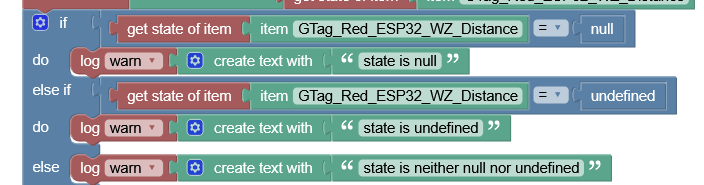
Just tried this on my current OpenHab 5 install with the real-life input item, which has an auto-expiry set up and is currently empty (and prints as an emtpy string from Blockly/JS):

which produces this code snippet

if (items.getItem('GTag_Red_ESP32_WZ_Distance').state == null) {
          console.warn('state is null');
        } else if (items.getItem('GTag_Red_ESP32_WZ_Distance').state ==
        undefined) {
          console.warn('state is undefined');
        } else {
          console.warn('state is neither null nor undefined');
        }

and outputs “state is null”.

Thoughts?

The behaviour was correct in 4.3.x as the mentioned PR fixes a regression from [items] Fix NULL Item state not recognized as null by florian-h05 · Pull Request #448 · openhab/openhab-js · GitHub.

The broken behaviour was shipped in openhab-js 5.12.0 and fixes in 5.13.0, but openHAB 5.x ships openhab-js 5.11.3, so the broken behaviour shouldn’t occur there.

1 Like

What version of OH are you running? What version of openhab-js?

As I’ve been saying, you never want to compare [get state of item] to null. That is never supposed to be null. There was only a brief period where null was possible, and it was fixed quickly.

If the Item’s state is NULL, [get state of item] will be the String "NULL". It will never be null.

If the Item’s state is UNDEF, [get state of item] will be the String "UNDEF". It will never be undefined.

Nothing associated with an Item will ever be undefined except in the case where the Item doesn’t exist. You’d test for that using [get item][MyItem] == undefined though as testing [get state of item][MyItem] when MyItem doesn’t exist will throw an error “undefined doesn’t have a property state” or something like that.

I posted above the Blockly if statement you should use to test if an Item’s state is NULL or UNDEF. Testing against the strings is the only valid way to test for this.

OpenHab is 5.0.3 (Build), vanilla install. Not sure how to determine the openhab-js version?

Tx for the explanation about string comparisons. Unfortunately, that simply doesn’t seem to apply here unless I’m missing something:

this

outputs this

get state of item
""

so the item state clearly appears to not be string valued with “NULL” or whatever content, but actually null (see above) in my case.

I do not have the MQTT stuff back up and running yet which would update this auto-expiry item with real data to I cannot exclude that this is some weird persistance (I’m on an external MariaDB) or auto-expiry related issue.

No, if it were null it would have logged out "null". The state of the Item is the empty String, which isn’t NULL, nor null nor UNDEF nor undefined.

What kind of item is this? what’s is the state of the Item shown on the Settings → Items page (note the unformatted state is shown there).

I can walk you through both the Java and the JS code to show you how the state of an Item in JS and therefore Blocky can never be null if you think it will help. From the moment the Item is created, its state is initialized with NULL and it’s impossible to set the state to anything but an OH state Object (NULL is an OH UnDefType Object).Attempting to do so generates and error.

Here’s the item as shown in the UI:

I’m afraid I really don’t have the time to dig into the sources right now, just wanted to make sure to point out a potential issue. It does seem that in this specific situation, Blockly really does see a null, not an empty string, as this

corresponding to this piece of code in the code view

        if (items.getItem('GTag_Red_ESP32_WZ_Distance').state == null) {
          console.warn('state is null');
        } else if (items.getItem('GTag_Red_ESP32_WZ_Distance').state ==
        undefined) {
          console.warn('state is undefined');
        } else {
          console.warn('state is neither null nor undefined');
        }

        if (items.getItem('GTag_Red_ESP32_WZ_Distance').state == '') {
          console.warn('state is empty string');
        } else {
          console.warn('state is NOT empty string');
        }

outputs this

2025-12-07 13:24:08.514 [WARN ] [nhab.automation.script.ui.53dbfd8e0c] - state is null
2025-12-07 13:24:08.520 [WARN ] [nhab.automation.script.ui.53dbfd8e0c] - state is NOT empty string

Am I missing something here?

If you let me know how I can figure out the openhab-js version, I’ll make note of that as well, if that helps.

I create a new Item called TestItem. I’ve posted an update to it to ensure it’s “NULL” and verify that it is “NULL”.

Using a script:

console.info(items.TestNumber.state);

log

2025-12-08 11:02:09.506 [INFO ] [tomation.jsscripting.rule.scratchpad] - NULL

In MainUI → Settings → Items

The state of the Item is NULL.

Copying the JS you posted above, replacing the Item name:

        if (items.getItem('TestNumber').state == null) {
          console.warn('state is null');
        } else if (items.getItem('TestNumber').state ==
        undefined) {
          console.warn('state is undefined');
        } else {
          console.warn('state is neither null nor undefined');
        }

        if (items.getItem('TestNumber').state == '') {
          console.warn('state is empty string');
        } else {
          console.warn('state is NOT empty string');
        }
2025-12-08 11:07:02.437 [WARN ] [tomation.jsscripting.rule.scratchpad] - state is neither null nor undefined
2025-12-08 11:07:02.440 [WARN ] [tomation.jsscripting.rule.scratchpad] - state is NOT empty string

All I can say is there is something broken about this Item.

On the UI it’s showing the state as NULL. When you log the state it shows empty String. When you try to compare it to null is shows as null.

Either this is Schrödinger’s Item or something is seriously broken about this Item.

Tx a lot! Will try to investigate “Schrödinger’s item” further ASAP - for now it seems to be neither dead nor alive :slightly_smiling_face:.

I guess it could be either a broken item, my specific installation/setup, or even the autoexpiry feature (see metadata config in UI)? Have you by any chance tried that? I won’t get around to fiddling with this before the weekend, probably.

That seems very likely. A properly configured expiration metadata should show the duration and the state to update or command to send:

image

The image you have posted only shows a duration. There’s a good chance this means the expire timer is actually sending some sort of null value.

You can easily fix this in the expire metadata, but it also probably shouldn’t be allowed by the UI (or OH Core?).

When no expiration state is provided, it defaults to UNDEF.

I just added expiration to my test Item without setting the expiration state and it only shows the time also.


So that should be OK. And when it expires it’s supposed to set the Item to UNDEF. I just ran a quick test and it appears to be working as expected. The Item does get set to UNDEF at the end of the expiry.

1 Like
