
-
Platform information:
- Hardware: Raspberry Pi 4/8G/diskless(NFS root)
- OS: ubuntu 24.04.3 LTS
- Java Runtime Environment: openjdk-21-jre-headless
- openHAB version: 5.0.1
-
Issue of the topic:
- Core question: Under OH5, in a JS rule action triggered by an MQTT subscription, how to I retrieve the MQTT topic? Answer that, and you can skip all the detail below. Otherwise …
- Details: I’m using MQTT to pass data between OH5 and my old MisterHouse system. All of it worked under OH4. Now, nearly everything works, except that OH5 has trouble receiving commands sent from MH. I have an MQTT broker, and an MQTT topic listener (can’t remember the proper OH term), and a rule that triggers successfully when a new state is published that matches the topic pattern. Once inside the JS rule, however, I don’t know how to retrieve the topic. I just need the name and attribute of object where the topic is stored. I’ve futzed around with event, triggerID, triggerUID, and other stuff I’ve found in prior posts, but none worked and none were for OH5. I’m sure it’s simple, but I can’t find docs or examples of exactly what contains this information. There’s so much info in the forum and docs for older versions, it obfuscates the current information, assuming it’s out there somewhere. Please pardon my frustration bleeding through. The good folks working on OH do great work and I very much appreciate all of you. It’s just sometimes hard to find out how to use your fine work.
-
Please post configurations (if applicable):
-
The broker thing:
UID: mqtt:broker:ihs label: MQTT Broker thingTypeUID: mqtt:broker configuration: lwtQos: 0 publickeypin: true clientID: [masked] certificate: [masked] hostnameValidated: false lwtMessage: offline birthRetain: true secure: true certificatepin: true password: [masked] protocol: TCP qos: 1 mqttVersion: V5 host: [masked] enableDiscovery: true birthTopic: app/openhab/system/state keepAlive: 60 publickey: [masked] birthMessage: online lwtTopic: app/openhab/system/state shutdownRetain: true reconnectTime: 60000 port: 8883 lwtRetain: true username: [masked] -
The topic listener thing:
UID: mqtt:topic:ihs:MQTT_Local_Cmnd_Listener label: MQTT_Local_Cmnd_Listener thingTypeUID: mqtt:topic configuration: {} bridgeUID: mqtt:broker:ihs channels: - id: MQTT_Generic_Cmnd_Listener_Channel channelTypeUID: mqtt:trigger label: MQTT_Generic_Cmnd_Listener_Channel description: “” configuration: stateTopic: app/openhab/+/cmnd/+ -
The test rule (nothing practical yet, some cut/paste errors I can’t quite make the website fix):
configuration: {}
triggers:

- id: “3”
  configuration:
  thingUID: mqtt:topic:ihs:MQTT_Local_Cmnd_Listener
  channelUID: mqtt:topic:ihs:MQTT_Local_Cmnd_Listener:MQTT_Generic_Cmnd_Listener_Channel
  type: core.ChannelEventTrigger
  conditions: [ ]
  actions:

* inputs: {}
  id: “2”
  configuration:
  type: application/javascript
  script: >-
  var log =
  Java.type(“org.slf4j.LoggerFactory”).getLogger(“org.openhab.script.MQTT_Listen_For_Local_Device_Commands”);type: script.ScriptAction
-
-
If logs where generated please post these here using code fences:
I just want to add that OH overall is pretty stable. It doesn’t change all that much from one version to the next. Often a post talking about OH 4, OH 3 or even OH 2 will still be largely correct and relevant for OH 5. There might be a better way to do it now than back then but usually even those old posts will still be relevant.
For another example of using MQTT Event channels, see MQTT Event Bus [4.0.0.0;5.9.9.9].
Thank you for the replies.
Regarding the base approach, I still don’t know what the object is that should contain the topic name. I suspect all I need is for someone to tell me the object name and attribute. Links are good, too, as long as they actually contain that information. I find many posts that are related to the subject, but don’t actually answer my specific question, or maybe I don’t recognize the answer when I see it.
Regarding the MQTT Event Bus … I like the concept and have already tried to use it. Clearly I’m doing something wrong, however, as I never get past “Template Pending”. It’s been pending for days now.
Assuming MainUI.
- Open the MQTT Broker Thing

- Open the Channels tab and click “add channel”. Fill in the form giving it a name. There’s only one type of Channel type to choose.
- Fill out the subscription. Usually this will be a wild card subscription. The “separator charactor” field will be the character inserted between the topic and the message in the event that gets sent to the rule.

-
Create a rule. Add a “Thing Event” trigger and select the Channel you created in 3.
-
The topic and message is passed into the rule as part of the event. How to get that depends on the rules’ language you are using. In Rules DSL it’s
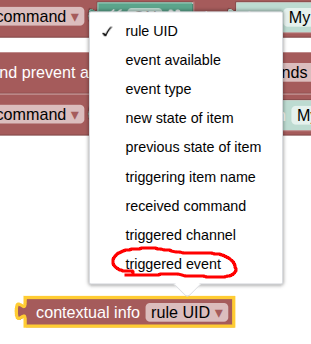
receivedEvent.In Blockly it’s under Run & Process in the context info block.
In JS it’s part of theevent Object(or if on OH 5.1 with the wrapper enabled or are using file based JS rules see this). Note the docs are not complete for the UI event Object. You need to access it withevent.event. -
In all of these cases,
receivedEvent, the contextual info block,event.eventorevent.receivedEventwill be a String consisting of<mqtt topic><separator character><received message>. For example, given the screen shot from aboveevent.eventmight be something likedadsOH/out/LivingroomLight#ON.
Therefore, in JS 5.0 in the UI you would get the message using the code in the link @jimtng posted or as seen in the MQTT event bus.
var topic = event.event.split('#')[0];
var message = event.event.split('#')[1];
Or in a JS file based rule or in 5.1 with the wrapper enabled:
const topic = event.receivedEvent.split('#')[0];
const message = event.receivedEvent.split('#')[1];
I’ve never seen “Template Pending” anywhere before. You see this where and when? When installing the template? When trying to instantiate a rule using the template?
Thank you. I’ll go through the process again following your excellent detailed instructions.
Regarding “Template Pending”, it appears on the Rules list. If I open the rule, it says “Uninitialized”. The rule looks like I filled in everything, but obviously something is amiss. I expect that when I follow your instructions, that issue will be resolved, so this is really just FYI.

When and how did you install the template? Where there any errors in the log when you installed it and/or when you created the rule based off the template? When there is no error creating a rule from a template should take no time at all. What ever is going on here is an error of some sort.
I would go to the Add-on store, remove the template and then readd it, watching the logs for errors.
Then return to the Rule and click “Regenerate” to recreate the rule based on the newly installed tempalte.
This explicit walk-through worked just great!
A little clarification for anyone else reading this, because the thread has two topics in it … in step 4 select “No template” if you have any rule templates involved. This walk-through is not part of the MQTT Event Bus discussion.
Thank you so much for giving all of us this very clear process.
I’ll respond to the MQTT Event Bus portion separately.
Regarding the MQTT Bus, yes there were errors in the log when I looked for them telling me I hadn’t filled in some values. In particular, it required I fill in an update group, even though I didn’t need/want that function here. Otherwise, my errors were mostly similar to the fact that the “MQTT Broker Thing” hint in the in-box looks so much like the name of my MQTT broker thing, that I thought it was auto-filled in when it was really blank.
After fixing those issues I found that the rule created from the template appeared to have two bugs in it. At least, the code didn’t run because values were undefined. It appears to me at my novice JS coding level, like two cases of “this.event” in the template should be “event.event”. I fixed those, still didn’t get what I wanted, and since I’d already solved my need the other way, didn’t chase down where the problem was. Other than the issue with “this.event” being undefined, I don’t think there’s anything wrong with the template.
Thank you again for the help.
The template requires both Groups. But they can be empty. There is no way to structure the template so that the two Groups are not required.
No, for those cases I’m testing whether the event Object even exists or not. If there is no event Object that means the rule was run manually or called from another rule and there’s nothing for the rule to do. It’s much better to detect and log that case than to throw an inscrutable error.
In the places it’s used, this.event is correct. Replacing that with event.event will break the functionality of the rule.
None of this explains the “Template Pending” state though.
Thank you for correcting my “this.event” misunderstanding. I was getting log reports that this.event was undefined, and as I was unfamiliar with the object in this context, I thought it might be a carry-over from a different language. As I indicated, I’m a novice in JS.
Regarding the “Template Pending” … I’m sorry I didn’t make that clear in my prior response. “Template Pending” was apparently caused by my not filling out all the fields. I’d failed to fill in the broker (because it visually looked to me like it was auto-filled when it was really just a hint), the update group, and another field that eludes me now. Once I filled those in correctly and regenerated, the “Template Pending” issue disappeared. That may be an issue from your perspective, but it makes sense to me as a user now. It would be nice if those errors were reported back through the UI instead of in the log, but that’s probably easier said than done.
OK, that explains the pending issue then. All required fields must be filled in and for that rule template all fields are required.
Just a note, I’ve posted a new version of the template though I’m seeing an error and I may have introduced a typo.
(There are new features in JS Scripting which change the event Object which are hard to thoroughly test.) If you still want to use it, look for a version 1.2 to be posted shortly