I have tried running the screen saver update rule and the callback rule, neither one works. The only way I have found to make the screen change brightness is to open the actual script in the callback rule and run the script.
Hi clark, the callback is thought to be more static, I’ll have to change the description somehow to make this more clear. With your setup, even if it would work as expected, the brightness would only change of the callback is called - that’s most likely not what you want.
Use the following approach in a rule, which is in my case triggered by any change of the Astro-Item:
I wanted to test it, but was not able to update the library correctly. Initially, I installed the library via the market place. After your update, I overwrote the yaml files in the developers section. Here, I’m able to see the new “None” unit in the Preview.
However, in the rules themselves, I still see the old card without “None”. Do I need to trigger somewhere, that the libraries are reloaded?
Still have problems with this on my own. After you saw the changes in the developer section, it takes some indefinite while until I can use them in the ‘real’ blackly environment. Sometimes it’s nearly instant, sometimes it takes a few minutes. I don’t know of any other trick than waiting
this looks great and i’m creating my first cards right now but this is all very new to me (never used blockly before)…
the shutter still doesn’t work, does it? i have the same problem with returnvalue “up” instead of “UP”…
also i seem unable to find some blocky elements? how am i supposed to ge the state of my blinds? the entity just accepts numbers so i’m not able to use “get state of item …” and i can’t even figure out how carlos creates number[get state of item [item] ] in post NSPanel Lovelace UI Helpers (part 1/5, v1.3) - #30 by clark …
version 0.8 is out now. This is just a bugfix release, if you don’t have any issues with this add-on there is no need to upgrade. As a small bonus you will get some helper which let’s you reload the current page - without additional parameters. Version 0.8 gives you:
various selector issues fixed
finally got shutter returnValue right
added page reload helper
And, just report any issues with the add-on, it’s still beta for a reason. And personally I am using the display now, therefore my try-and-error phase is over and the things (pages) I am using are working fine
I like the work you have done on NSPanel with cards in Openhab. Finally a solution that directly integrates with Items that don’t require MQTT to port to another platform.
It works well but I get some errors in my OpenHab log that i can’t get resolved.
I’ve made some screenshots of the cards I created and the errors I get in OpenHab Log.
Ahh, and maybe have a look at the installation description as well - it’s a little special how all of the different parts play together. But keeping the information of the Panel to work with out of the cards (and use it from callback) was required to have these cards running on different panels in your?/my home. This way you only need one callback per panel, seems to work nicely for me
best regards, (I might be offline for a week),
Rene
Thanks for the swift feedback. I tried to add the callback but then the system gets into some kind of loop. I have to stop the rule and remove it to make it stable.
hard to say how the loop gets triggered in the first place without seeing your cardGrid script. Try to configure the callback in the beginning as close as possible like the example, try the cardGrid just without any other configuration around, just the plain cardGrid in some blockly script. Remove some external blocks, if you added some. Best build and extend from there.
As you see, not really a lot I can say, if you are still in trouble just post the callback and the nspanel1_cardGrid script somewhere. Those loops might also be caused by some previous wrong configuration - to go around this disable and re-enable the callback to reset any environment variables it keeps.
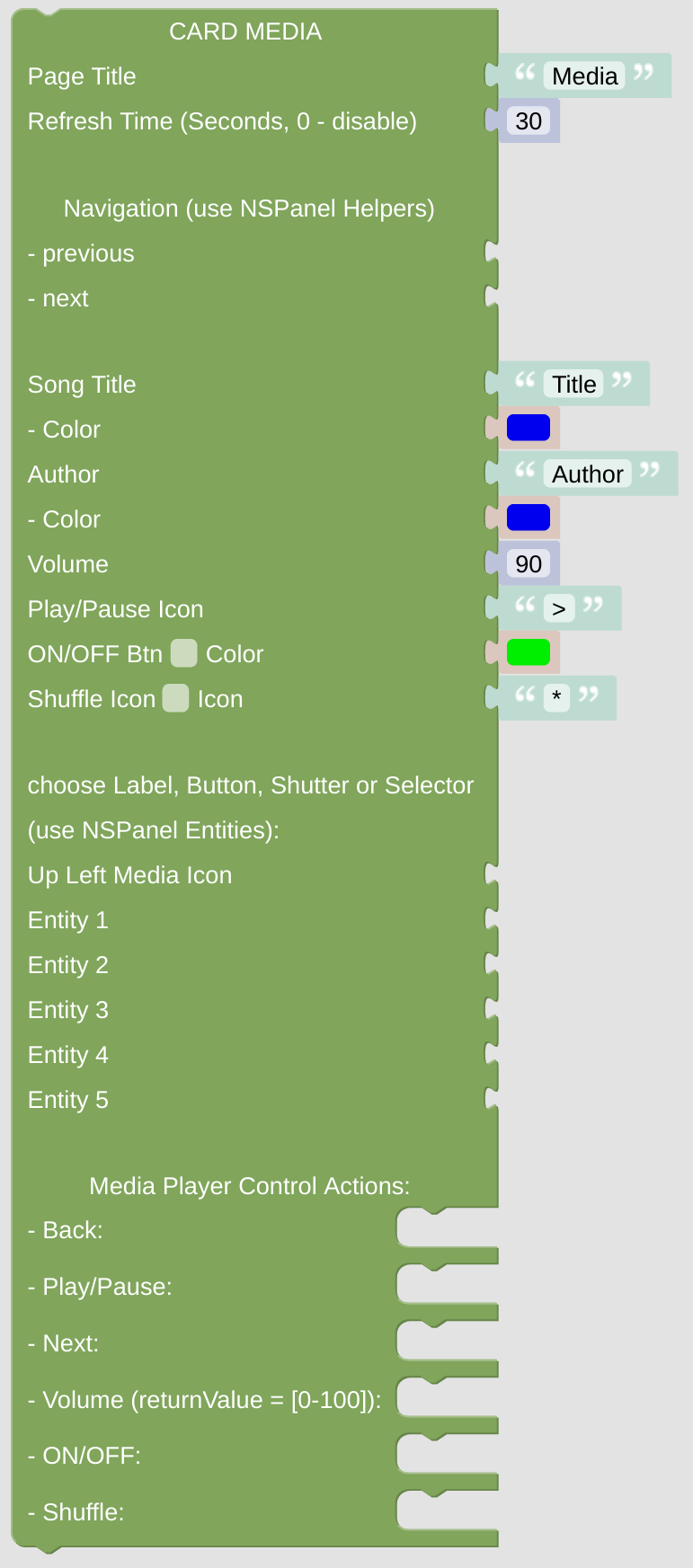
i got the volume control working but i’m struggling with PLAY/PAUSE…
this is my item: Player piCoreK_control "Küche Control" (piCoreK) ["Receiver"]
and its state is either “PLAY” or “PAUSE”.
i’m able to get the correct icon with this:
but i’m not able to send the correct command with this:
there is no returnValue available in these Media Player Control Actions except in the Volume action. The Panel does not know the state of your player, it’s just stupid and triggering some action. You should check the state on your own, as you can see in the example below (with Owntone, not Squeezebox - you need to adapt this)