
Check if you have followed all installation steps:
OK, thanks. I see, apparently there is no easy way to install, when using the docker image. One person managed to get it run by copying some files manually. I will try that.
I use a Docker install. The easiest way is to install npm on the host and then install to the conf/automation/js folder mounted as a volume to the contianer. This woks both with folder volumes and docker volumes.
Alternatively you can build a custom image that includes npm, or use the “Executing shell scripts before openHAB” feature of the container to install npm.
Or you just clone the repo and put the files in $OH_CONF/automation/js/node_modules/openhab_rules_tools.
If you do not install using npm you will have to keep up with updates manually.
1 Like
Hi Rich
I just installed this rule template today because I’m on vacation 
I’m already on 4.2.0.M3 and have changed from:
const hState = i.history.historicState(time.toZDT().minusDays({{days}}));
To:
const hState = i.persistence.persistedState(time.toZDT().minusDays({{days}}));
Can you confirm? I can check today evening if it works. But just in case someone else is already on M3.
Yes, I’m pretty sure that’s the change that will need to be done. If it works without throwing exceptions then that’s correct.
I was waiting until the full 4.2 release before I update my rule templates to adjust to the breaking changes. Though I might try to get the update posted this evening because it occurs to me that this template is the only one that’s impacted by the changes in persistence. I’m hoping I can do an “if version is > X” type check so I don’t have to fork the template once again and have three separate copies of the template posted.
It works 
I’ve updated the template. It will work with both versions before openhab-js 5.0.0 and after so it should work with 4.2 M3+. You will need to reinstall the template and reinstantiate the rule after the template is reinstalled.
I think I created a rule based on the template, but I’m not sure…
First oddity: when I wanted to select ON or OFF for Enable Simulation, I was only offered a list of items, not the choice between ON or OFF:
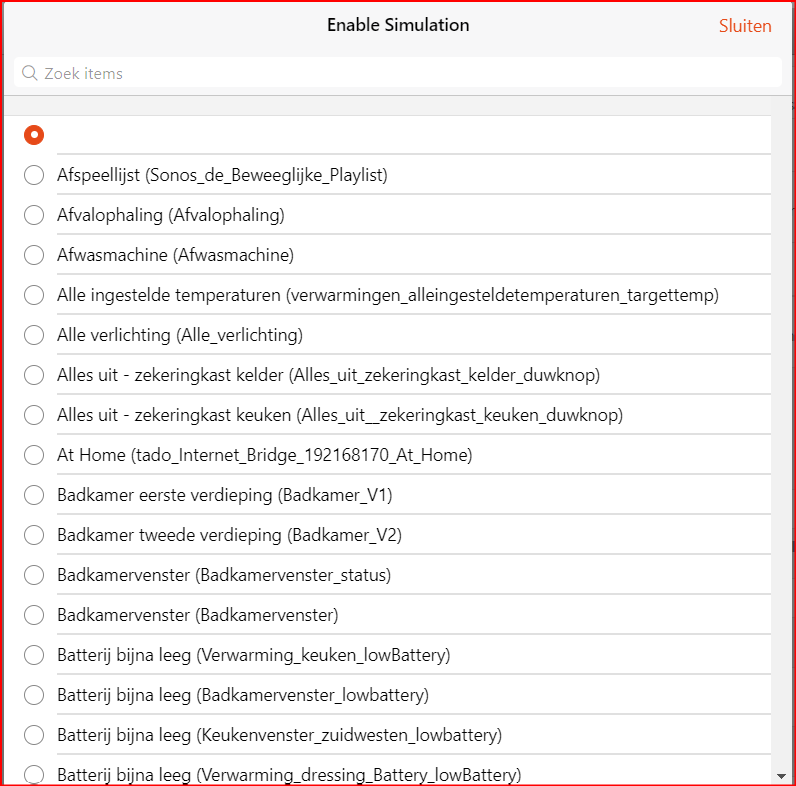
(So I didn’t select anything.)
Second oddity: where are al the specifics stored/visible?

configuration:
  simItems: vakantieverlichtinggroep
  days: 3
triggers: []
conditions: []
actions: []
Also, when I run the rule manually, nothing logs.
If course. As described in the table above, “Enable Simulation” is the Switch Item that controls whether the rule runs or not. When this switch is ON the time runs. When it is OFF, it doesn’t.
It’s a required parameter so it shouldn’t let you save the rule if you don’t select an Item for it.
That indicates the rule didn’t get instantiated correctly. Once a rule is created from a template it’s a rule just like any other.
I misinterpreted that. Now it looks good!
The rule implemented it the other way. I just had to change the operator from != to = because the light in the living room went on suddenly  (I didn’t (knowingly) change this when creating the rule…)
It’s described correctly in the original post, not my reply.
| Parameter | Type | Purpose |
|---|---|---|
| Enable Simulation | Switch Item | Switch Item which, when OFF, will trigger the simulator rule to run. OFF was chosen to make it easier to tie the rule to an Item that tracks presence. |
Indeed, the rule gets enabled when the switch is OFF. This is because one can use a Switch Item that represents presence to drive the rule and most use ON to indicate someone is home and OFF to indicate no one is home so it would be the OFF state one would want to use to start the presence simulation.
1 Like
Quick question on this one (I’m running openHAB on Docker). I’m struggeling a bit, getting the openHAB Rules Tools installed, specifically applying the part “manual instruction” here to my Docker enviroment. Does anyone have a step-by-step for a docker installation?
You have to have npm installed on the host. Once installed, just navigate to the $OH_CONF/automation/js folder on the host and run npm install openhab_rule_tools.
If you don’t have npm on the host machine or don’t want it:
- create the folder
$OH_CONF/automation/js/node_modules/openhab_rules_tools - download the latest release from Releases · rkoshak/openhab-rules-tools · GitHub (zip or tgz are the same)
- extract the code from the zip file to
$OH_CONF/automation/js/node_modules/openhab_rules_tools. It should look like this:

Make sure it didn’t extract to a subfolder or something like that.
Note with this approach you will not get updates. You’ll have to manage the library updates on your own.
Thanks!
Quick question on the first approach (npm install openhab_rule_tools the host machine):
- Right now I’m running a docker configuration where I backup the entire folers
openhab_conf,openhab_addonsandopenhab_userdataonce per night via Duplicati, so that, whenever my system crashes, I can just install a new raspi, deploy the entire stack and restore the three folders via Duplicati to these fresh containers. Aftewards I have a perfectly healthy openHAB that is fully upgrade-able. - Since
npmis not part of a standard docker container, this installation step has to be included into a potential recovery protocol, to be able to installopenhab_rule_toolsafterwards. So two additional steps on the recovery protocol. Correct? - The reason why I’m asking: Assuming I follow the first approach (
npm install openhab_rule_tools) and I’d do a system recovery as described afterwards, I’d have to re-install npm and the rules tools again (even though they might be in the openhab_conf-folder already) to maintain the upgrade-ability.
Did I get this right? Or is the upgrade-ability of the rules tools maybe not eve a thing? How often are the rules tools even upgraded? Or can I just install them once into the openhab_conf-folder, and then they get backuped and restored, even though npm is maybe not present on the host container anymore (after a total system recovery)?
Not necessarily. Once installed it’s just a bunch of .js files in a folder. You’d need to install npm at some point to upgrade the library but that’s not required to restore and have a working OH.
No, npm manages everything as plain text files. If $OH_USERDATA/automation/js is part of the backup and the restore, you don’t even need npm any more. You only need npm to initially install the library and to upgrade it later. npm is not required to use the library. You can just restore the folders and files and run as is. Then if at some point you need to upgrade then you just need to install npm long enough to upgrade. You could then just remove npm after that if you wanted to.
Kind of, but you don’t need npm installed to use the library, just to install and upgrade it. Once it’s installed you don’t need npm any more and you can just keep these files as part of your backup and restore.
It’s definitely a thing, particularly when openhab-js has breaking changes. I have code built in that checks the versions and throws an error if the versions of openhab-js and OHRT are not compatible. If you see that, you’ll need to update.
Less now than in the past and it’s stable enough where most of the time the rule templates do not need to update to still work with older versions. I do have some stuff I need to add to most of them so they work better in Blockly (not all of the timer related classes work with the Blockly cancel timer block the way I want). So that’s something to look forward to.
1 Like
Hi everyone,
I’m having an issue with the presence simulation.
I always get the following error in the log for many lights. Here an example:
[WARN ] [.automation.rules_tools.Presence Sim] - Licht_Wohnzimmer_Spots does not have a historic state for 7 days ago rrd4j
I’m using OpenHAB 4.1.3 and the addon version: rule template version 1.0
My default persistence service is rrd4j.
But I also added the service to the function as a parameter:
const hState = (helpers.compareVersions(utils.OPENHAB_JS_VERSION, '5.0.0') < 0) ? i.history.historicState(when, "rrd4j") : i.persistence.persistedState(when);
My item config looks like this and has the group Sim:
Dimmer Licht_Wohnzimmer_Spots "Licht Wohnzimmer Spots" <light> (Lichter,Lichter_Indoor,Licht_Wohnzimmer,Sim) ["Setpoint","Light"] {channel="deconz:dimmablelight:bridge:00178801097334200b:brightness", channel="deconz:dimmablelight:bridge:00178801096d39b60b:brightness", alexa="Light"}
My rrd4j persistence configuration looks like this:
Strategies {
        everyMinute     : "0 * * * * ?"
        every5Minutes   : "0 */5 * * * ?"
        every15Minutes  : "0 */15 * * * ?"
        everyHour       : "0 0 * * * ?"
        everyDay        : "0 0 0 * * ?"
        default = everyChange
}

Items {
  * : strategy = everyChange

  //Anwesenheitssimulation:
  Sim* : strategy = everyChange
}
The configuration is unchanged for many weeks still it does give the error that there are no historic states available?
I also would like to mention, that the presence is for example working for this light:
Dimmer Licht_Werkstatt_Decke "Licht Werkstatt Decke" <light> (Lichter,Lichter_Indoor,Licht_Werkstatt,Sim) ["Setpoint","Light"] {channel="deconz:dimmablelight:bridge:003c84fffebef01b01:brightness", alexa="Light"}
But it has the same configuration?!
What am I missing? Thanks for your help!
Your rrd4j persistence configuration is bad. Rrd4j requires the state of the Item be saved at least every minute. Without that it cannot work properly and will always return null.
Furthermore, have a * config and a Sim* config with the same strategies is redundant. The * applies to all Items reguardless of the Group membership.
Hi Rich,
thank you for the quick answer I changed this line now:
Sim* : strategy = everyMinute
I will see in 7 days if it is working.
As my presence simulation rule is called every 5 minutes I could be enough to use this strategy, right?
Sim* : strategy = every5Minutes
But what I don’t understand is why the persistence doesn’t know the state of the lights when it is told to save every change.
Lets say the light switches on at 2pm and switches off at 4pm.
So the persistence should now that at 3pm the light was switch on right?
Can someone explain this behaviour in general to me?
Thanks a lot
No, rrd4j requires everyMinute. that’s the only strategy that works.
Because rrd4j completely breaks when you don’t use everyMinute.
It’s in the docs for the add-on. If you don’t use everyMinute, you may as well not have any persistence at all.
1 Like