
Hi All,
Openhab version: 4.3.5
Platform: Rpi4
I’m creating a widget where I can choose the time to set a certain temperature on a certain time. It’s working fine but the layout is a bit strange. Can someone help me correct the layout? I want the Send / Clear en clock icon on the same row. At this time the send button is always below this input-item and the clock and clear button are overlapping eachother.
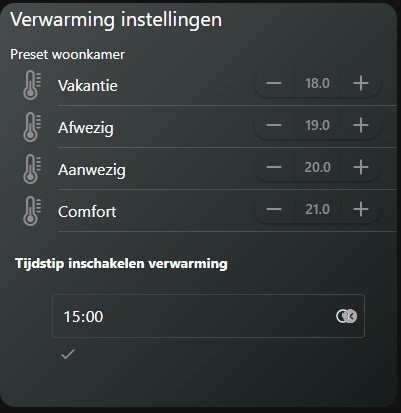
uid: verwarming_settings_card
tags: []
props:
  parameters:
    - default: "#474c4d"
      description: Gradient eerste kleur linksboven
      label: Achtergrond kleur 1
      name: backcolor2
      required: false
      type: TEXT
    - default: "#171c1d"
      description: Gradient eerste kleur rechtsonder
      label: Achtergrond kleur 2
      name: backcolor1
      required: false
      type: TEXT
    - default: white
      description: Kies een kleurnaam
      label: Kleur van text
      name: fontcolor
      required: false
      type: TEXT
    - default: gray
      description: Kies een kleurnaam
      label: Kleur van icons
      name: iconcolor
      required: false
      type: TEXT
    - context: item
      description: Huidige Temperatuur
      label: Item
      name: curtemp
      required: false
      type: TEXT
  parameterGroups: []
timestamp: Sep 26, 2025, 8:49:48 AM
component: f7-card
config:
  padding: false
  style:
    background: "=themeOptions.dark === 'dark' ? 'linear-gradient(to top left,' +
      props.backcolor1 + ' 0%,' + props.backcolor2 + ' 100%)' :
      'linear-gradient(to top left,' + props.backcolor1 + ' 0%,' +
      props.backcolor2 + ' 100%)'"
    border-radius: 15px
    box-shadow: "=themeOptions.dark === 'dark' ? '0px 0px 0px' :
      'var(--f7-card-expandable-box-shadow)'"
    margin-left: 0px
    margin-right: 0px
    width: 100%
slots:
  content:
    - component: f7-row
      config:
        style:
          margin: 0px
      slots:
        default:
          - component: Label
            config:
              style:
                color: white
                font-size: 20px
                margin-left: 10px
              text: Verwarming instellingen
    - component: f7-row
      slots:
        default:
          - component: f7-col
            slots:
              default:
                - component: oh-list
                  config:
                    simpleList: false
                  slots:
                    default:
                      - component: Label
                        config:
                          style:
                            color: white
                            margin-left: 10px
                            margin-top: 10px
                          text: Preset woonkamer
                      - component: oh-stepper-item
                        config:
                          color: '=themeOptions.dark == "dark" ? "gray" : "white"'
                          icon: f7:thermometer
                          iconColor: '=themeOptions.dark == "dark" ? "gray" : "white"'
                          item: Woonkamer_4
                          raised: true
                          round: true
                          step: 0.1
                          style:
                            color: white
                            font-size: 16px
                          title: Vakantie
                          visible: true
                      - component: oh-stepper-item
                        config:
                          color: '=themeOptions.dark == "dark" ? "gray" : "white"'
                          icon: f7:thermometer
                          iconColor: '=themeOptions.dark == "dark" ? "gray" : "white"'
                          item: Woonkamer_1
                          raised: true
                          round: true
                          step: 0.1
                          style:
                            color: white
                            font-size: 16px
                          title: Afwezig
                          visible: true
                      - component: oh-stepper-item
                        config:
                          color: '=themeOptions.dark == "dark" ? "gray" : "white"'
                          icon: f7:thermometer
                          iconColor: '=themeOptions.dark == "dark" ? "gray" : "white"'
                          item: Woonkamer_2
                          raised: true
                          round: true
                          step: 0.1
                          style:
                            color: white
                            font-size: 16px
                          title: Aanwezig
                          visible: true
                      - component: oh-stepper-item
                        config:
                          color: '=themeOptions.dark == "dark" ? "gray" : "white"'
                          icon: f7:thermometer
                          iconColor: '=themeOptions.dark == "dark" ? "gray" : "white"'
                          item: Woonkamer_3
                          raised: true
                          round: true
                          step: 0.1
                          style:
                            color: white
                            font-size: 16px
                          title: Comfort
                          visible: true
                      - component: Label
                        config:
                          style:
                            font-weight: bold
                            margin-left: 15px
                            margin-top: 20px
                            margin-bottom: -20px
                          text: Tijdstip inschakelen verwarming
                      - component: oh-input-item
                        config:
                          name: Set verwarming
                          item: Verwarming_time
                          type: time
                          label: Starttijd Verwarming
                          clearButton: true
                          sendButton: true
                          showTime: true
                          outline: true
                          style:
                            width: 100%
                            padding: 10px
                            margin-left: 0px
Think it can be fixed with the style options, but I can’t get anything to change if i try to add some code to the style section, for example: this doesn’t do anything:
                            --f7-label-font-weight: 400
                            --f7-label-height: 16px
                            --f7-label-font-size: 12px
Hope someone can help me.