
Two Simple rules stopped triggering

  • Platform information:
    • Hardware: Raspberry Pi 4
    • OS: openhabian
    • openHAB version: 5.1.1

I have two simple rules that are all made with the UI, they trigger my two separate greenhouse fans, both identical aside from the relay they send the ON command to. Every 5 minutes it is set to turn the relays on, with a Blockly if condition that generates the code listed below. The if condition checks the temp of the greenhouse to see if it is greater than or equal to the set point for said fan and if it is, it sends the ON command to the relay. It worked perfectly fine for two weeks and then today out of nowhere, the rules for both fans stopped triggering. I could manually trigger the rules and they would run. I tried removing the if condition from the rule, still wouldn’t trigger. Rebooted the raspberry pi, with no effect. I made an identical new rule without the if condition and it would trigger until I added that if condition back in. Just for something to try I changed it from greater than or equal to, to just greater than and then both rules triggered with no issues. Since I generated the code with blockly and have had no issues till now, I don’t think it’s something I could have done in the code. But I can’t think of or find any reason that it would have done that…

items.getItem('Greenhouse_South_3_Greenhouse_Temperature').state >= items.getItem('GreenhouseNorthFanSetpoint').state;

Put the whole rule in so we can see it.
I think you need to make sure you are comparing numerical state.

items.getItem('Greenhouse_South_3_Greenhouse_Temperature').numericState >= items.getItem('GreenhouseNorthFanSetpoint').numericState;

It functioned fine for two weeks though before it suddenly stopped and is functioning fine again now that I switched it from >= to just >… So it has to be comparing the correct states for it to be working at all doesn’t it?

I designed the rule with the ui, so is this what you’re wanting to see or a screenshot of the rule?

configuration: {}
triggers:
  - id: "1"
    configuration:
      cronExpression: 0 0/5 * * * ? *
    type: timer.GenericCronTrigger
conditions:
  - inputs: {}
    id: "3"
    configuration:
      type: application/javascript
      blockSource: <xml xmlns="https://developers.google.com/blockly/xml"><block
        type="logic_compare" id="L3$e0U#bfYdL_xo/F-x*" x="142" y="69"><field
        name="OP">GT</field><value name="A"><block type="oh_getitem_state"
        id="PLn]9G@9z#DJ;Q:GTm3d"><value name="itemName"><shadow type="oh_item"
        id=";=0|QahJGi5{u,}e!U3r"><mutation itemName="MyItem"
        itemLabel="MyItem"></mutation><field
        name="itemName">MyItem</field></shadow><block type="oh_item"
        id="|vLF9^BiUA,w*1C]s||y"><mutation
        itemName="Greenhouse_South_3_Greenhouse_Temperature"
        itemLabel="Greenhouse South 3 Temperature"></mutation><field
        name="itemName">Greenhouse_South_3_Greenhouse_Temperature</field></block></value></block></value><value
        name="B"><block type="oh_getitem_state" id="t{%OJ9./Hb4%h7Zd_%Lq"><value
        name="itemName"><shadow type="oh_item"
        id="3a_YRc3fh0]!X2{H+by2"><mutation itemName="MyItem"
        itemLabel="MyItem"></mutation><field
        name="itemName">MyItem</field></shadow><block type="oh_item"
        id="fNnFaKSNom$IXrn!rDAR"><mutation
        itemName="GreenhouseNorthFanSetpoint" itemLabel="Greenhouse North Fan
        Setpoint"></mutation><field
        name="itemName">GreenhouseNorthFanSetpoint</field></block></value></block></value></block></xml>
      script: >
        items.getItem('Greenhouse_South_3_Greenhouse_Temperature').state >
        items.getItem('GreenhouseNorthFanSetpoint').state;
    type: script.ScriptCondition
actions:
  - inputs: {}
    id: "2"
    configuration:
      itemName: Greenhouse_Airlock_Relay_1
      command: ON
    type: core.ItemCommandAction

I don’t use blocky. Someone else may know.

There’s a button to convert the blockly layout into equivalent JS code. Try posting the textual script.

Hi,
use numericState

Did anything else change, an upgrade to OH or change in settings?

In OH 5.1 JavaScript Scription, which is what Blockly “compiles” to wrappers were added to the ability to use certain key features of JS including return. See JavaScript Scripting - Automation | openHAB but the important part is

Explicitly using return: If the script condition wrapper is enabled (see below), the return keyword has to be used to return a boolean value (true or false). … When using Blockly, there is a return block available from the “Run & Process” category. … all conditions to wrapper use can simply turn on the “Wrap Script Conditions in Self-Executing Function” option in the add-on settings.

The last part is a little confusing taken out of context like that but what it means is if Settings → JavaScript Scripting → Show Advanced → Wrap Script Conditions in Self-Executing Function, you must use the return block in your Blockly conditions. If that setting is toggled off, you must not use the return block in your Blockly conditions.

But note, that the use wrapper directive can be enabled/disabled on a condition script by condition script basis. And indeed you will see that the "use wrapper" directive is added to the script at the top when you add the return block. But it does not add the "use wrapper=false" directive when the return block is not present. Therefore, if you have enabled the “Wrap Script Conditions” setting on the JavaScript Scripting add-on and you do not use the return block, the Script Condition will fail.

This might be worth filing an issue.

In the mean time, I recommend always using the return block in your Script conditions. This will always work whether or not you’ve toggled the wrapper setting. It also makes for more reasonable code (i.e. you don’t have a node hanging out there not plugged into anything).

Also pay attention to @Tschetan’s suggestion. The state of an Item is a String. >= with Strings compares them alphabetically, not their actual value. So "2 °C" >= "100 °C" is true.

If these Items have units, use the comparison operators you find in the Units of Measurement collection of blocks.

image

If not, use the “get numeric state” and the regular comparison operators.

image

It may be that my blaming the wrapper for the cause is not the problem afterall and it worked before because you are using a string comparison instead of comparing numbers and it just so happens that alphabetically now the comparison is producing a different value from what the numeric comparison would.

Just as an idea, it might make sense it there was a ready-made condition that could compare the state of two different Items, handling unit conversion and all that. Someone would have to make it though.

I tried that once in OHRT but eventually abandonded it. There are just too many valid combinations and the code got completely unruly.

It might be easier now that JS Scripting supports boolState.

I was thinking that it could be made in Java in core, as a “standard condition” that could be utilized by any rule, regardless of language. But, the possible combinations might turn out to be just as unruly there.

The idea of a more user-friendly comparison solution keeps coming back to me. If this cannot be solved in the bigger picture, then perhaps it can be solved in a way that is suited to Blockly’s target audience.
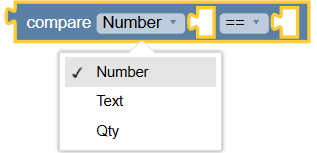
I am thinking of an additional dropdown field for the type: [Number, String, Qty]. This would change the check parameter, the options in the second dropdown field, and the formula.

For String, only equal / not equal would be offered.
For Qty, a different formula would be used.
The dependency between the dropdown fields might be implemented with this plugin.
The default would be Number.
It would replace the Logic Compare block.

I can imagine — with my very limited knowledge — that this should be possible.
What I cannot picture, however, is how the migration for existing scripts could be handled. As a fallback, the existing Logic Compare block might not be replaced directly, but instead be “hidden” under Math at the very bottom.

E: Link to Plagin change - Perplexity for Translate

There is still a place for > < >= <= operations with Strings, for example in sorting lists.

But overall there is somewhat limited logic built in to blocks. Making a singel block that can produce three almost complete different blocks of code based on the option selected is a really big lift. I’m not entirely certain it’s possible at all. Add in the complexity that you need to change the types of what can be plugged in to the empty slots and adding tests for null which will be required because if the state of an Item cannot be converted to a Number a null is returned it becoime super untenable.

Too bad.
For the rare case of String, I had already thought about the workaround via a variable. Boolean could be handled with a separate entry or as part of Number. DateTime would be too complicated again.

From my observations here and in the German forum, most Blockly beginners without prior experience run into this trap. A multi-compare block like this could guide them in the right direction in a less frustrating way.

I’m not arguing it would not be useful. Just that it’s not really feasible to do the way that Block libraries work. I could be wrong and someone may figure something out but my attempts have all failed.

I still can’t give up on this yet.

I now have the following test library. Without the plugin field-dependent-dropdown, > is currently fixed to greaterThan for Qty. For <, I also added a null check, although at the moment that is only a precaution.

If anyone has the time and interest: can toolbox/component/PresetInput be adjusted dynamically? According to the Blockly docs, toolboxes can be modified programmatically.?

editable: true
uid: aaaTestVergleich
tags: []
props:
  parameters: []
  parameterGroups: []
timestamp: Jun 15, 2026, 7:35:12 PM
component: BlockLibrary
config:
  name: aaaTestCompare
slots:
  blocks:
    - component: BlockType
      config:
        args0:
          - name: InputType
            options:
              - - Number
                - Number
              - - Text
                - String
              - - Qty
                - Qty
            type: field_dropdown
          - name: Compare
            options:
              - - ==
                - "{{input:First}} == {{input:Second}}"
              - - "!="
                - "{{input:First}} != {{input:Second}}"
              - - <
                - "({{input:First}} ?? 0) < ({{input:Second}} ?? 0)"
              - - ">"
                - "{{input:First}}.greaterThan({{input:Second}})"
            type: field_dropdown
          - align: left
            name: First
            type: input_value
          - name: Second
            type: input_value
        colour: 210
        helpUrl: ""
        inputsInline: true
        message0: compare %1 %3  %2  %4
        output: Boolean
        tooltip: ""
        type: block1
      slots:
        code:
          - component: BlockCodeTemplate
            config:
              template: "{{field:Compare}}"
        toolbox:
          - component: PresetInput
            config:
              fields:
                NUM: 0
              name: First
              shadow: true
              type: math_number
          - component: PresetInput
            config:
              fields:
                NUM: 0
              name: Second
              shadow: true
              type: math_number

Info: Research and translation by Perplexity.