
Here is the file itself. I had to add .txt for the forum to accept it, remove that again after downloading, it’s supposed to be called just openHAB2.setup.
openHAB2.setup.txt (219.5 KB)
After having saved the file somewhere, you start the Eclipse Installer as usual, select “Eclipse IDE for Java developers”, Next and then when you get here:

..you click the little + button that I’ve tried to point out, which leads to this dialog:
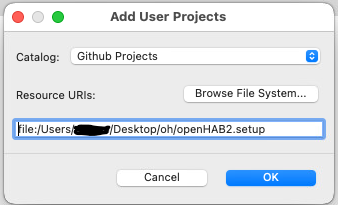
Select “Github Projects” under “Catalog” (it won’t work without something there), and either Browse File System or enter/paste the full URL to the .setup file. After clicking OK, you will have a new openHAB project under <User>, and this is the tweaked .setup file. Select and continue as usual from there.
It’s not ticked, at got the same behavior on macOS (not Windows AFAICR), what I did is go to the POM in Eclipse, hover over the URL address that’s underlined in red, and then an option “Force download..” showed up. I clicked that, and the error was gone.
The problem with that is that everything else points to “latest”. If you lock down the version of just one component but let the others use the latest, problems are bound to occur some time in the not to distant future. If you locked down everything with compatible versions, it would continue to work, but you would miss “new features” like Java 24 support etc. once they become available.
I also hate the “latest” strategy, because it is so random and everybody basically have to be beta-testers for everything. But, you can’t have it both ways, so unless somebody would like to maintain a “known good combination” of versions, I think “latest” is the only realistic option long term. But, it means that users will be bitten by new bugs as they arrive..