Fixed grid page - where to define background color and/or height of the widgets

Hello everyone,

I’m currently trying to create my first page in openHAB that isn’t a sitemap, and I’m really stuck… :frowning:

I’ve read the documentation several times now, but somehow nowhere does it explain how, where, and which settings to set/find for certain things…

Maybe you can help me :slight_smile:

I created the following page:

yaml:

config:
  label: test2
  sidebar: true
  hideNavbar: true
  style:
    background: black
blocks:
  - component: oh-block
    slots:
      default:
        - component: oh-grid-row
          config: {}
          slots:
            default:
              - component: oh-grid-col
                slots:
                  default:
                    - component: oh-image-card
                      config:
                        height: 250px
                        width: 100px
                        style:
                          height: 250px
                          width: auto
                          --f7-card-bg-color: var(--f7-color-gray)
                        item: openHABServer_Item_wetter_Image
              - component: oh-grid-col
                config: {}
                slots:
                  default: []
              - component: oh-grid-col
                config:
                  style:
                    background: transparent
                slots:
                  default:
                    - component: oh-image-card
                      config:
                        height: 250px
                        style:
                          --f7-card-bg-color: var(--f7-color-gray)
                        url: http://xxx/s.jpg
                        refreshInterval: 500
                        action: command
                        actionItem: vPopupCam
                        actionCommand: ON
        - component: oh-grid-cells
          config: {}
          slots:
            default: []
masonry: []
grid: []
canvas: []

But I’m still struggling with the following:

  • How do I set the background colors correctly? I ended up with the fixed grid because the “Background: black” option works there, but not with the canvas…

  • Where can I find the right color options for the individual widgets? For the image card, I had to use the Chrome debugger to find the CSS option “–f7-card-bg-color: var(–f7-color-gray),” but that can’t be the right way, can it?

  • I was able to set the height of my two image card widgets, but I also want to define the width. How do I do that?
I’m far from an expert in Pages but I can answer some of these.

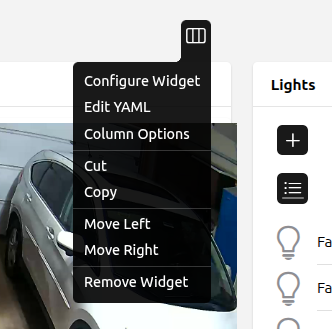
The width is dynamic, not fixed. Under the widget’s settings you tell it what percentage of the row to take up based on the size of the screen.

From the page editor click on the widget configuration and choose Column Options.

Then you choose what percentage of the row that widget will take up based on the width of the screen/window.

In this example, the widget will take up the full row except for screens over 1200 pixels wide. The width of the widget will grow or shrink as appropriate.

I can’t really answer the rest.

The yaml you have posted is for a regular responsive layout page. It is not a fixed grid or a fixed canvas. Those would show additional properties in the page config section.

That section gives you a link to the page with all the reference documentation for OH widgets and the link to the f7 documentation the widgets are based on.

The links in mentioned in the section above will tell you if such an option exists for any individual component. But, the short answer is: yes, in many cases that is the right way.

Why? The Oh widgets, and the F7 library they are built on are intended to be a low code entry point to create responsive UI. That, by definition, means restricting many of the available options with the use of a reasonable set of default values. For any users that want to go beyond the low-code threshold, that will mean interacting with the underlying css and html.

Your use case is a good example. The background of the f7 cards (and therefore the oh cards) is responsive to the light/dark theme of the viewer. For many basic users having the ability to modify that color easily would often result in confusion or an unsatisfactory result when the color they pick that looks good in a light theme suddenly looks terrible or is even unusable when their device switches to a dark theme. You are free to move up to that more advanced control and start working with the widget’s css, but now it begins to fall to you to understand the fuller consequences of what you are doing.

1 Like

Thank you both very much for your help and answers :slight_smile:

I’ve also made some progress:

I’ve actually decided on a fixed grid layout, as I think this will allow me to better control the size, shape, and location of the widgets. Is that right?

Nevertheless, I still have a few questions and would just like to ask them in the hope that you or others will answer me :slight_smile:

The learning curve for widgets is actually very flat, because even after rereading the documentation and the article you linked to, I’m still not really clear on how to create my own widgets with my own design. I also keep finding options that I can’t find in any documentation, but which are mentioned in the forum…

  • I used the following widget for the trash calendar from here and customized it slightly. However, I can’t seem to center the text and badges vertically in the rows. The same goes for the text in the badges; everything is always slightly shifted upwards. Do you have any ideas?

    uid: garbage_list
    tags: []
    props:
      parameters:
        - description: Text Size
          label: Text Size
          name: textSize
          required: false
          type: TEXT
        - description: Title of the card
          label: Title
          name: title
          required: false
          type: TEXT
        - description: The card footer
          label: Footer
          name: footer
          required: false
          type: TEXT
        - description: Metadata namespace for collection color
          label: Color metadata
          name: collectioncolor
          required: true
          type: TEXT
        - description: Metadata namespace for collection labels
          label: Label metadata
          name: collectionlabel
          required: true
          type: TEXT
        - description: Metadata namespace for collection icon
          label: Icon metadata
          name: collectionicon
          required: false
          type: TEXT
        - description: Your local translation for tomorrow
          label: Tomorrow translation
          name: tomorrow
          required: true
          type: TEXT
        - description: Your local translation for today
          label: Today translation
          name: today
          required: true
          type: TEXT
        - description: How many days in the future appointments should be displayed
          label: Days in future
          name: future
          required: true
          type: TEXT
        - context: item
          label: Date items
          name: dategroup
          required: true
          type: TEXT
      parameterGroups: []
    timestamp: Nov 5, 2025, 1:55:02 PM
    component: f7-card
    config:
      title: =props.title
    slots:
      default:
        - component: f7-card-content
          slots:
            default:
              - component: f7-list
                config:
                  mediaList: true
                slots:
                  default:
                    - component: oh-repeater
                      config:
                        fetchMetadata: =[props.collectionlabel, props.collectioncolor,
                          props.collectionicon]
                        for: item
                        groupItem: =[props.dategroup]
                        map: "loop.item_source.sort((x,y) => (x.state).localeCompare(y.state, undefined,
                          { numeric: true }))[loop.item_idx]"
                        sourceType: itemsInGroup
                      slots:
                        default:
                          - component: oh-list-item
                            config:
                              style:
                                font-size: "=props.textSize ? (props.textSize)+'px' : '18px'"
                                --f7-badge-font-size: "=props.textSize ? (props.textSize)+'px' : '18px'"
                                --f7-badge-padding: 10px
                              badge: '=((dayjs(loop.item.state).diff(dayjs().startOf("day"), "days")) == 0 ?
                                (props.today) :
                                (dayjs(loop.item.state).diff(dayjs().startOf("day"),"days"))
                                == 1 ? (props.tomorrow) :
                                items[loop.item.name].displayState)'
                              badgeColor: '=((dayjs(loop.item.state).diff(dayjs().startOf("day"), "days")) ==
                                0 ? "red" :
                                (dayjs(loop.item.state).diff(dayjs().startOf("day"),
                                "days")) == 0 ? "yellow" : false)'
                              icon: '=loop.item.metadata[props.collectionicon] == null ? "f7:trash" :
                                loop.item.metadata[props.collectionicon].value'
                              iconColor: =loop.item.metadata[props.collectioncolor].value
                              title: =loop.item.metadata[props.collectionlabel].value
                              visible: =loop.item.state != "UNDEF" &&
                                (dayjs(loop.item.state).diff(dayjs().startOf("day"),
                                "days")) >= 0 &&
                                (dayjs(loop.item.state).diff(dayjs().startOf("day"),
                                "days")) <= props.future
        - component: f7-card-footer
          slots:
            default:
              - component: Label
                config:
                  text: =props.footer
    
    
  • When I change the date of an item in the selected group, it doesn’t change in the trash widget. Am I doing something wrong? I always have to reload the page…

  • And for the camera, I use the following yamel. I created a custom widget from it and added it to my page, and the pop-up opens when the corresponding item is turned on. However, I now have an empty card on my page. If I set the card to invisible, I no longer see the pop-up either…

    uid: popup-cam_Haustuer
    tags: []
    props:
      parameters:
        - description: url
          label: url
          name: url
          required: true
          type: TEXT
        - context: item
          description: Proxy Item
          label: Proxy Item
          name: proxyItem
          required: true
          type: TEXT
      parameterGroups: []
    timestamp: Nov 5, 2025, 3:18:32 PM
    component: f7-popup
    config:
      closeByBackdropClick: false
      opened: =(items[props.proxyItem].state == 'ON') ? true:false
      style:
        height: 500px
        width: 900px
    slots:
      default:
        - component: oh-image
          config:
            lazy: false
            refreshInterval: 100
            style:
              max-width: 100%
              width: 100%
            url: =props.url
        - component: oh-button
          config:
            action: command
            actionCommand: OFF
            actionItem: =props.proxyItem
            style:
              --f7-button-bg-color: transparent
              --f7-button-hover-bg-color: transparent
              --f7-button-pressed-bg-color: transparent
              height: 100%
              left: 0px
              position: absolute
              top: 0px
              width: 100%
              z-index: 15
          slots:
            default:
              - component: f7-icon
                config:
                  f7: xmark_rectangle_fill
                  style:
                    font-size: 50px
                    position: absolute
                    right: 15px
                    top: 15px
                    vertical-align: middle
                  textColor: white


Once you’ve got the basics, diving in and trying it out (and asking the forums for help) is the next best step in learning, so you’re right on track.

This shouldn’t be the case, can you point to these errors so that we can try and improve the docs?

This is actually a fairly advanced issue. Since the widget system is using the f7 library of components as the base for (nearly) everything, you are working within what’s already there and that’s just not how these list items are constructed. So, you have two options: 1) use the stylesheet parameter to inject some custom css to target a couple of different child elements (quicker, but less robust) or 2) switch from a oh-list-item to an f7-list-item-row and build your own list item within that empty container element (more advanced and more robust).

Of the many different css solutions, I think the easiest is probably just to change the item-inner container to a flexbox and then make sure that you increase the width of the item-title-row container to explicitly be 100%:

component: f7-card
config:
  title: =props.title
  stylesheet: |
    .item-inner {
      display: flex !important;
    }
    .item-title-row {
      width: 100%;
    }

loop.item.state is always static. The responsive dynamic state must be accessed using items[loop.item.name].state. The explanation is here.

I don’t use the fixed-grid at all, so I don’t have quite the same level of knowledge here, but it sounds like when you add something to the grid it is automatically given a card space, which makes sense. So, you are trying to work a little outside the intended use of the grid by including a widget that isn’t supposed to show up on the grid so some hacking is to be expected. The first thing I would try would be to move the popup grid box location to some far unused corner of the page and then go to the code tab on the page editor and manually set the width on the popup grid-item to 0.

If that doesn’t work then the next step would be to just integrate the popup yaml into one of the other widgets that’s already on the page. Then it doesn’t have to be added to the page separately.

Once again, thank you very much for your replies :slight_smile:
As you can see from the other thread, I’m also struggling with the abstract way in which the widgets are created and simply can’t find the right options I need to format/position the f7 elements the way I want…even despite using the browser’s dev tools…

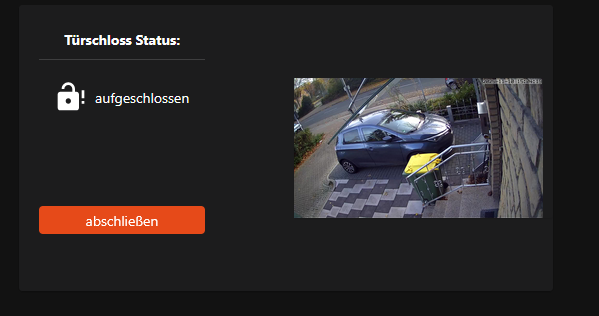
But I have made progress and now have the following widget:

yaml:

uid: cust_door_lock_and_image
tags: []
props:
  parameters:
    - description: Title
      label: Static Title
      name: title
      required: false
    - description: State Title
      label: State Title
      name: stateTitle
      required: false
    - context: item
      description: Item Popup
      label: Item Popup
      name: itemPopup
      required: true
      type: TEXT
    - context: item
      description: Item State
      label: Item State
      name: itemState
      required: true
      type: TEXT
    - context: item
      description: Item Command
      label: Item Command
      name: itemCommand
      required: true
      type: TEXT
    - description: Image url
      label: Image url
      name: url
      required: false
  parameterGroups: []
timestamp: Nov 10, 2025, 6:38:18 AM
component: f7-card
config:
  title: =props.title
  stylesheet: |
    .card-header {
      justify-content: center;
    }
slots:
  default:
    - component: f7-row
      config:
        style:
          display: flex
          align-items: center
          height: 100%
      slots:
        default:
          - component: f7-col
            config:
              style:
                height: 100%
                width: 1fr
                display: felx
            slots:
              default:
                - component: f7-row
                  config:
                    style:
                      height: 50%
                      width: 80%
                      display: flex
                      align-items: center
                    class:
                      - justify-content-center
                  slots:
                    default:
                      - component: oh-label-card
                        config:
                          padding: 0
                          noBorder: true
                          noShadow: true
                          stylesheet: |
                            .item-media { display: flex; align-items: center; }
                            .item-media { margin-right: 8px; }
                          icon: '=items[props.itemState].state == 3 ? "iconify:mdi:lock-open-alert" :
                            (items[props.itemState].state == 1 ?
                            "iconify:mdi:lock" : "")'
                          headerStyle:
                            font-size: var(--f7-card-header-font-size)+"px"
                          fontSize: var(--f7-card-header-font-size)+"px"
                          class:
                            - text-align-center
                          title: =props.stateTitle
                          label: =items[props.itemState].displayState
                - component: f7-row
                  config:
                    style:
                      height: 50%
                      width: 80%
                      display: flex
                      align-items: center
                    class:
                      - justify-content-center
                  slots:
                    default:
                      - component: oh-button
                        config:
                          fill: true
                          style:
                            width: 80%
                          visible: '=items[props.itemState].state == 3 ? "true" :
                            (items[props.itemState].state == 1 ? "true" :
                            "false")'
                          text: '=items[props.itemState].state == 3 ? "abschließen" :
                            (items[props.itemState].state == 1 ? "aufschließen"
                            : "")'
                          action: command
                          actionCommand: '=items[props.itemState].state == 3 ? 2 :
                            (items[props.itemState].state == 1 ? 1 : "")'
                          actionFeedback: '=items[props.itemState].state == 3 ? "abschließen" :
                            (items[props.itemState].state == 1 ? "aufschließen"
                            : "")'
                          actionItem: =props.itemCommand
          - component: f7-col
            config:
              style:
                width: 2fr
            slots:
              default:
                - component: oh-image-card
                  config:
                    url: =props.url
                    refreshInterval: 500
                    action: toggle
                    actionItem: =props.itemPopup
                    actionCommand: ON
                    actionCommandAlt: OFF
                    style:
                      margin: 0
    - component: f7-popup
      config:
        closeByBackdropClick: false
        opened: =(items[props.itemPopup].state == 'ON') ? true:false
        style:
          height: 500px
          width: 900px
      slots:
        default:
          - component: oh-image
            config:
              lazy: false
              refreshInterval: 100
              style:
                max-width: 100%
                width: 100%
              url: =props.url
          - component: oh-button
            config:
              action: command
              actionCommand: OFF
              actionItem: =props.itemPopup
              style:
                --f7-button-bg-color: transparent
                --f7-button-hover-bg-color: transparent
                --f7-button-pressed-bg-color: transparent
                height: 100%
                left: 0px
                position: absolute
                top: 0px
                width: 100%
                z-index: 15
            slots:
              default:
                - component: f7-icon
                  config:
                    f7: xmark_rectangle_fill
                    style:
                      font-size: 50px
                      position: absolute
                      right: 15px
                      top: 15px
                      vertical-align: middle
                    textColor: white

It works as it should, but I would like the first/left column to only take up about 1/3 to 1/4 of the total size so that the image is larger, and I just can’t get that to work. There is always a border somewhere that shouldn’t be there… :frowning:

Do you have any tips?

I now know where my difficult beginnings come from:

At the beginning, I read the following link: Creating Personal Widgets | openHAB
But it doesn’t contain everything!

It was only after reading the following link that I became smarter about how the whole thing works: Pages - Custom Widgets | openHAB

Maybe the names aren’t chosen very precisely?
Because under the link for creating custom widgets, I would have expected the content from the custom widget link…

And last but not least:

This thread mentions that the cols/rows may be removed at some point, but how would I then create the layout I want?

You have given those columns fr unit widths. That doesn’t apply here. There’s an unfortunate confusion with the f7 terminology here. The f7 rows and cols are part of the f7 grid layout system, but this is not a true css grid. It’s just a series of containers with a lot of extra calculations to make thing appear in a grid-like organization. A true css grid is only 1 container divided up into regions with child elements assigned to each of those regions. fr size units only apply in in a true css grid.

What you’ve got here is a great example of some of the things that are mentioned with regard to extra baggage that comes with f7 in that recent thread you linked to. If you use your browser tools look at that first column, because it ignores the 1fr width assignment, it’s width is give by: width: calc((100% - var(--f7-grid-gap)*(var(--f7-cols-per-row) - 1))/var(--f7-cols-per-row));. That’s pretty clearly more complex than you’re looking for.

So a simple solution is just to move to column width units that are valid. If you set the widths to 33% and 66%, you’ll get close to what you’re looking for from the columns.

In this case, however, I might suggest that you really do move to a true css grid. That fits pretty well with what you are looking to do and will actually greatly reduce the number of components you need in this widget. You can see an example in this thread:

Unfortunately, that’s one that is impacted by old thread image issues right now, but the widget code in the grid example is the important part.

To get a grid you want to use just a plain div component, and give it a grid display and then define the gird pattern. That’s done in three parts, define the spacing within each row (here we can use the fr unit), define the spacing of the rows, and then assign some names to each of the grid spaces using the same name for spaces that you want merged together. For this simple layout that should look something like this:

- component: div
  config:
    style:
      display: grid
          grid-template-columns: 1fr 2fr
          grid-template-rows: 1fr 1fr
          grid-template-areas: >
            'statusCard imageCard'
            'actionButton imageCard'

That’s it. Now you don’t need a single f7 row or column! You just place each of the other 3 components in the default slot of that div. You can either place them in order and have them automatically fill in (in this case the order you want should be label card, image card, button), or you can directly assign them their locations (I prefer to do this just to be sure) by adding the grid-area style to each component. For example to the style of your image card you would add grid-area: imageCard and then that card will be placed in the gird cells you named imageCard no matter what order the child elements are in.

This will give virtually no space between the elements, but now spacing is easier too. You can either give each child element margins that will put individual spacing around the element or you can give the grid container a gap style that will apply the same space between all columns and rows.